
Can a Logic Board Be Repaired: A Practical 2026 Guide

A logic board can usually be repaired when the fault is a single failed component or a localised short, with UK board-level work typically costing £100–£350. Common examples include power, charging and some liquid-damage faults, although a damaged CPU, severe burning or an unrecoverable multilayer break can make replacement the more sensible option.
Your laptop may have gone dark overnight. The charger appears connected, there's no charging response, the fan doesn't move and pressing the power button achieves nothing. At the counter, the obvious question is, “Is the logic board dead, or is one small part stopping the whole machine from starting?”
That distinction matters. A standard repair shop may offer a module swap, such as replacing a battery, charging port or complete board. A board-level technician works differently, using measurements and microscope inspection to identify the failed component on the original board. The right answer depends on the fault, the condition of the board, the device's value and the importance of the data.
Table of Contents
Common Logic Board Faults and Whether They Are Repairable - Power faults - Charging faults - Liquid damage - Graphics faults
How Technicians Diagnose a Logic Board Step by Step - 1. External inspection and history - 2. Charger and input testing - 3. Voltage-rail measurements - 4. Thermal and short tracing
Repair vs Replace vs Buy New - Four questions to ask before approving work
Your Pre-Repair Checklist Before Visiting a Workshop - Before leaving home - During the booking conversation - Before approving repair
When a Dead Laptop Turns Into a Repair Question
A customer brings in a MacBook that stopped working after being left on charge overnight. There's no fan noise, no display and no obvious damage. The first instinct is often to blame the logic board, but the board is only one possibility. A failed charger, damaged USB-C port, flat battery or broken power-button circuit can produce much the same symptoms.
The first job is to separate a device-level fault from a board-level fault. A technician checks the charger and input path before removing shields or reaching for a soldering iron. If power reaches the board but a rail is shorted, the next question becomes whether the short sits in a replaceable capacitor, power-management IC, MOSFET or another local component.
Counter-side advice: A laptop that shows no signs of life hasn't automatically lost its logic board. It has lost a working power sequence, and the cause still needs to be isolated.
There's also a difference between repairable and economically repairable. A technically successful repair may not make financial sense if the machine is old, has several unrelated faults or needs a rare board that costs nearly as much as a replacement device. Conversely, repairing the original board can preserve data and avoid the uncertainty of a used donor board.
The UK repair economy is large enough to support this specialist work. The consumer electronics repair sector was estimated at £268.0 million in 2024, with 41,261 businesses, while industry value grew at a 0.7% CAGR from 2019 to 2024 and business count grew by 4.8% annually over that period, according to the UK industry figures summarised by Steel City IT's micro-soldering repair guide. That doesn't guarantee every fault can be fixed, but it explains why specialist diagnosis is available beyond manufacturer board replacement.
A competent workshop should be able to tell you whether the board is a realistic repair candidate after inspection and electrical testing. Ask what will be tested, whether the work is done in-house and what happens if the board is found beyond economical repair.
What a Logic Board Actually Is
A logic board is the main circuit board inside a laptop, MacBook, console or other computer. It connects the parts that calculate, store, power and communicate. Calling it a single part can be misleading, because it's really a densely packed system of separate circuits working together.
A useful mental model is a small city:
The CPU and GPU form the central processor district. They handle calculations, instructions and graphics. Damage here is usually more serious because these chips are highly integrated and difficult, or impossible, to replace economically.
RAM is the short-term memory area. It provides fast working space for active tasks. On many modern devices it's soldered to the board, so a fault may affect the board's overall repairability.
The SSD is the long-term storage vault. It holds the operating system and files. Depending on the device, storage may be removable or closely tied to the board, which makes data preservation an important part of the diagnosis.
The power-management quarter controls electricity. Charging controllers, regulators, FETs, coils and capacitors convert incoming power into the different voltages required by the processor, memory, storage and ports.
The input/output harbour connects external equipment. USB-C, HDMI, keyboard, display, audio and other interfaces depend on controllers, connectors and supporting circuits.

The roads between these districts are the copper traces and power planes. A failed capacitor may block one local route. A damaged connector may cut off an input harbour. A shorted power IC can bring down a complete rail while leaving the processor itself intact.
That's why micro-soldering can work. The technician doesn't replace the entire city when one junction fails. They identify the affected circuit, remove the faulty component and fit a suitable replacement under magnification. UK repair guidance describes this process as inspection, voltage-rail mapping, thermal or current-draw tracing and component replacement on the original board, which can preserve the device and its existing data, as outlined by Electronic Partners' PCB repair service.
The limits are just as important. A cracked multilayer board, damaged processor or widespread burn damage may involve internal connections that can't be restored reliably. In those cases, a board swap or replacement device may be the honest recommendation.
Common Logic Board Faults and Whether They Are Repairable
A laptop that dies after a spill needs a different answer from one that just stops charging. The outside symptom identifies a failure area, not the failed part. “No power” might mean a charger fault, shorted capacitor, failed power controller or damaged processor. A sound quote comes after testing.
Power faults
A dead laptop can have a failed power-management component, a short on a main rail or damage around the input circuit. If the short is localised and the board still completes usable power sequencing, component-level repair is realistic. A board with several dead rails, heat damage or a failed processor is usually a poor repair candidate. A single rail or IC fault is typically priced at £100–£250 in UK repair practice.
Charging faults
A laptop that runs from its battery but refuses to charge may have a damaged port, USB-C controller, charging circuit or battery communication fault. The socket itself may be defective, so replacing the whole logic board before checking the port and charge path can waste money. Board-level charging work commonly falls between £100–£350, with the upper end more likely when the USB-C controller needs repair. Micro-soldering repair services can address these localised board faults without replacing the complete board.
Liquid damage
Liquid damage remains repairable in some cases, particularly when power is removed quickly and corrosion has not spread. Residue around connectors, capacitors and charging circuits can often be cleaned, followed by targeted component replacement. A board left powered while wet may develop several shorts and damaged traces. That increases labour, uncertainty and the chance that replacement will provide better value.
Graphics faults
Display distortion, missing output and graphical instability can begin in the display assembly, cable, backlight circuit, graphics power stage or GPU. A local fault in the power stage may be repairable. A failed integrated GPU or processor often makes replacement more sensible, especially in an older machine. The key distinction is whether the damaged part is supporting the graphics system or is the main chip itself.
Fault category | Typical symptoms | Common component cause | UK repair cost | Repair or replace |
|---|---|---|---|---|
Power | No response, no boot, no fan activity | Power IC, MOSFET, capacitor or shorted rail | £100–£250 typical for a single rail or IC fault | Repair if the failed area is localised |
Charging | Won't charge, intermittent charging, port not recognised | Port, charging controller or power-delivery circuit | £100–£350, rising if the USB-C controller needs board-level work | Repair is commonly sensible after port and charger checks |
Liquid damage | No power, corrosion, short circuit or progressive failure | Corroded capacitor, connector, IC or trace | Can reach the upper part of the UK board-level range when cleaning and trace work are needed | Repair quickly if corrosion is limited, replace if damage is widespread |
Graphics | Flickering, artefacts, missing display or crashes under load | Backlight circuit, graphics power stage or integrated graphics chip | Quote depends on whether the fault is in support circuitry or the main chip | Repair support circuits, consider replacement for core-chip failure |
Many no-power and charging complaints are not logic board faults. The charger, battery or port may be responsible, so a workshop should confirm the input path before quoting board repair. A UK guide to common laptop faults makes the same practical distinction between symptoms and confirmed board failure.
How Technicians Diagnose a Logic Board Step by Step
Soldering should be near the end of the process, not the beginning. A technician first gathers the failure history, checks the external hardware and measures how the board behaves when power is applied.
1. External inspection and history
The technician records when the device failed and what happened immediately beforehand. A spill, drop, replacement charger, overheating event or previous repair changes the likely fault path. The board and casing are then checked for corrosion, swelling, burnt areas, damaged ports and signs of earlier rework.
2. Charger and input testing
A known-good charger and cable remove an easy source of confusion. A USB ammeter or bench supply shows whether the device draws nothing, draws a brief pulse or pulls excessive current. Each response points towards a different stage of the power sequence.
3. Voltage-rail measurements
Using a multimeter, the technician checks key rails and test points. They may use diode-mode readings to compare a suspected circuit with expected behaviour, then trace whether a voltage is missing because its regulator failed or because something downstream is shorting it.
4. Thermal and short tracing
A thermal camera can reveal a component heating unusually quickly when power is applied. Where the temperature difference is too small to see, current injection, resistance checks and systematic isolation help narrow the fault. The aim is to move from a board containing hundreds of parts to one suspect capacitor, IC, MOSFET or damaged trace.
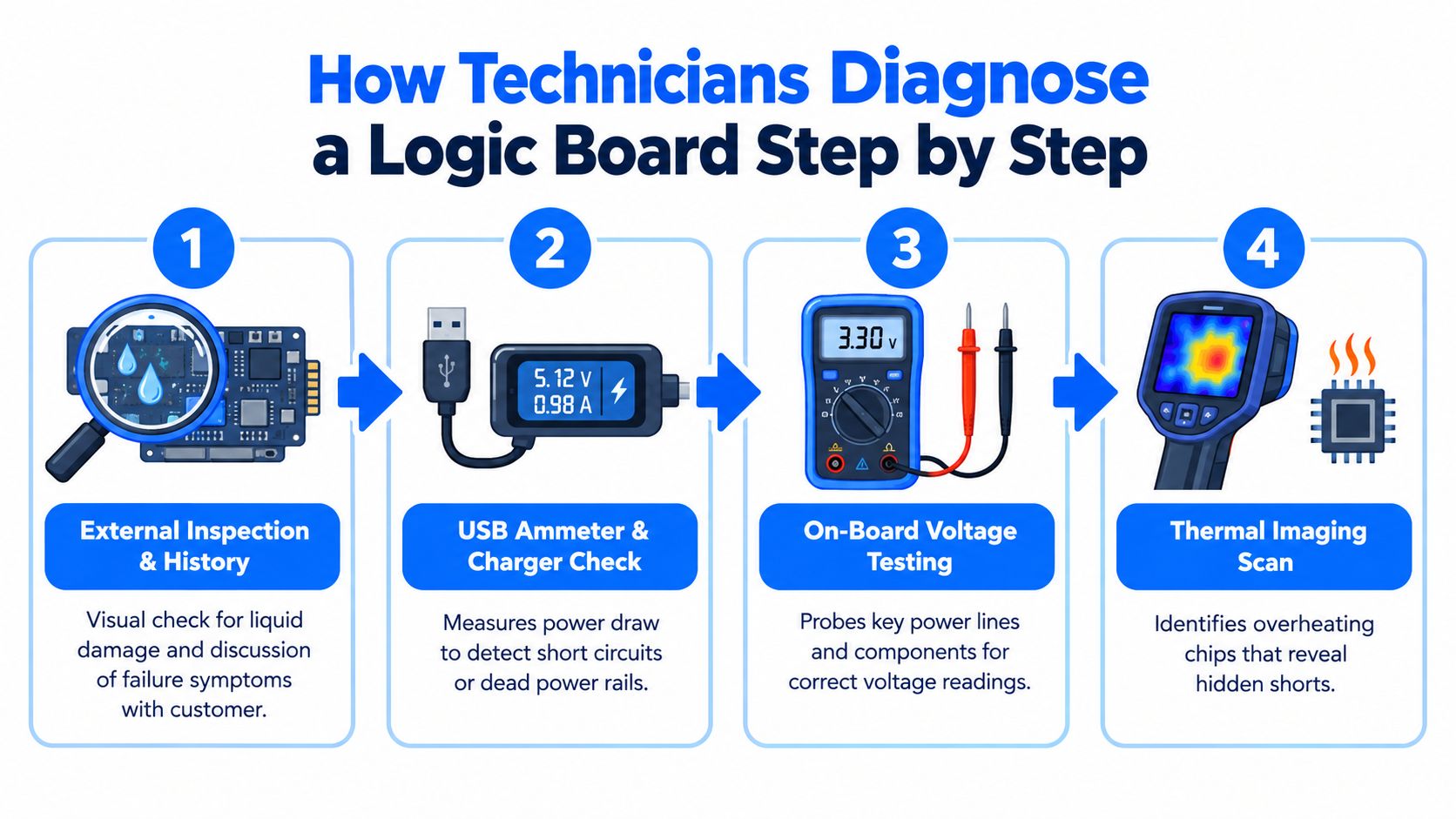
This approach is why an experienced workshop won't promise a repair from a symptom alone. The same dead screen can come from a failed backlight circuit, display cable, panel or board rail. Professional diagnostics from Steel City IT describes the value of structured testing before repair approval.
A standard diagnostic may take 30–90 minutes, depending on access and the fault, but the customer may wait longer for a written conclusion if the board needs deeper tracing. A complex multilayer board can require schematics, boardview information and controlled testing before a safe quote is possible.
The following video provides a visual introduction to the kind of diagnostic sequence used in board-level work:
Repair vs Replace vs Buy New
A laptop can be technically repairable and still be the wrong repair to approve. Compare the board work with a compatible donor board and a replacement device, then account for data, setup time, remaining faults and the machine's expected working life.
Option | Typical UK cost | Turnaround | Data preserved | Best when |
|---|---|---|---|---|
Component-level board repair | £100–£350 as a practical UK working range, with complex work potentially higher | Depends on diagnosis and parts availability | Usually, if the original board is restored | One localised fault affects an otherwise suitable device |
Refurbished or donor logic board | £250–£600 fitted | Depends on sourcing and compatibility | Not automatically, especially where storage is tied to the original board | The original board is beyond economical repair and a compatible board is available |
New replacement device | £700–£1,400 for a comparable new laptop, based on current UK retail pricing | Immediate once purchased | Only after backup or transfer | The existing device is old, damaged in several areas or no longer meets your needs |
These figures support a decision, not a guaranteed quote. A £150 component repair can make sense when the laptop remains suitable for work and its battery, display, keyboard and storage are healthy. The same repair is poor value when several of those parts are already close to failure.
The practical question is whether the repair restores a dependable machine, rather than whether a technician can make the board start once.
Four questions to ask before approving work
How old is the device, and what condition are the other parts in? A recent laptop with one failed power component usually favours repair. An older machine with corrosion and several worn modules may justify replacement.
Does the data matter more than the hardware? If files are not backed up, repairing the original board may preserve access. A replacement board can leave storage access or security pairing unresolved.
Is the fault localised? Ask whether the technician found one failed component, a damaged trace or widespread board damage. “Logic board fault” does not explain the repair by itself.
What happens if the repair fails? Confirm the diagnostic charge, approval limit, warranty and whether attempted work is chargeable when the board remains unusable.
Repair is strongest when the fault is isolated, the board can be restored safely and the rest of the device is in good order. A donor board becomes more attractive when the original has several damaged areas but the laptop is otherwise worth keeping. Buying new usually wins when there is severe liquid spread, burned board layers, a damaged processor or several failed power rails.
Liquid Damage and the Race Against Corrosion
A drink runs across the keyboard, yet the laptop stays on. Saving a file or testing the charger feels sensible, but powered operation can turn a local spill into a wider electrical fault.
Shut the device down immediately. Disconnect the charger, remove accessible power if the design allows it and stop pressing the power button. Position the laptop to let liquid drain, keep it away from heat and arrange a workshop inspection quickly. For a full walkthrough of the first response, see what to do when liquid is spilled on a laptop. Rice cannot remove residue from connectors or beneath board components, and household drying does not remove conductive contamination.
Corrosion and short circuits can continue spreading after the spill, which is why technicians treat the first hours as decisive. The UK liquid-damage repair guidance also recommends immediate power-off and prompt inspection instead of repeated testing.
At the workshop, the technician records the affected areas before cleaning. Depending on the board and contamination, diagnosis may involve disassembly, controlled cleaning, microscope inspection, corrosion removal, rail testing and replacement of damaged capacitors, connectors or ICs. The board is tested for shorts before power is applied again.
After a spill: Power off, do not charge it and do not use repeated start-up attempts as a test. Each extra power cycle can make the fault harder to diagnose.
Water may leave less residue than sugary drinks, coffee or tea, but no liquid spill is harmless. The useful assessment is whether corrosion has reached the power, charging, backlight or data circuits, and whether the affected board can be stabilised reliably.
A recent spill does not guarantee recovery. Prompt isolation can limit further powered corrosion, while early inspection helps identify whether the fault is economically repairable or whether board replacement is the more dependable choice.
Your Pre-Repair Checklist Before Visiting a Workshop
Treat the booking as part of the repair. Good information helps the technician choose the right test path, while clear approval limits protect you from paying for work you didn't authorise.
Before leaving home
Back up what still works: Copy important files if the device can boot, even if it seems unstable.
Record the symptoms: Note the last normal use, warning lights, charging behaviour, noises and any spill or drop.
Gather the essentials: Bring the charger and cable, plus the serial number or proof of ownership if available.
Avoid experiments: Don't keep charging a liquid-damaged device or open it unless you know how to isolate the battery safely.
During the booking conversation
Ask whether the workshop performs board-level diagnostics and micro-soldering in-house or sends boards elsewhere. Confirm whether there's a diagnostic fee, whether it's deducted from approved work and how long the initial assessment is expected to take.
Before approving repair
Set a cost ceiling: Tell the technician not to proceed beyond an agreed amount without contacting you.
Request the fault in writing: The job sheet should distinguish a failed component from an unconfirmed board suspicion.
Confirm warranty terms: Ask what parts and labour are covered and what exclusions apply.
Protect your accessories: Make sure the charger and other items are listed on the job sheet.
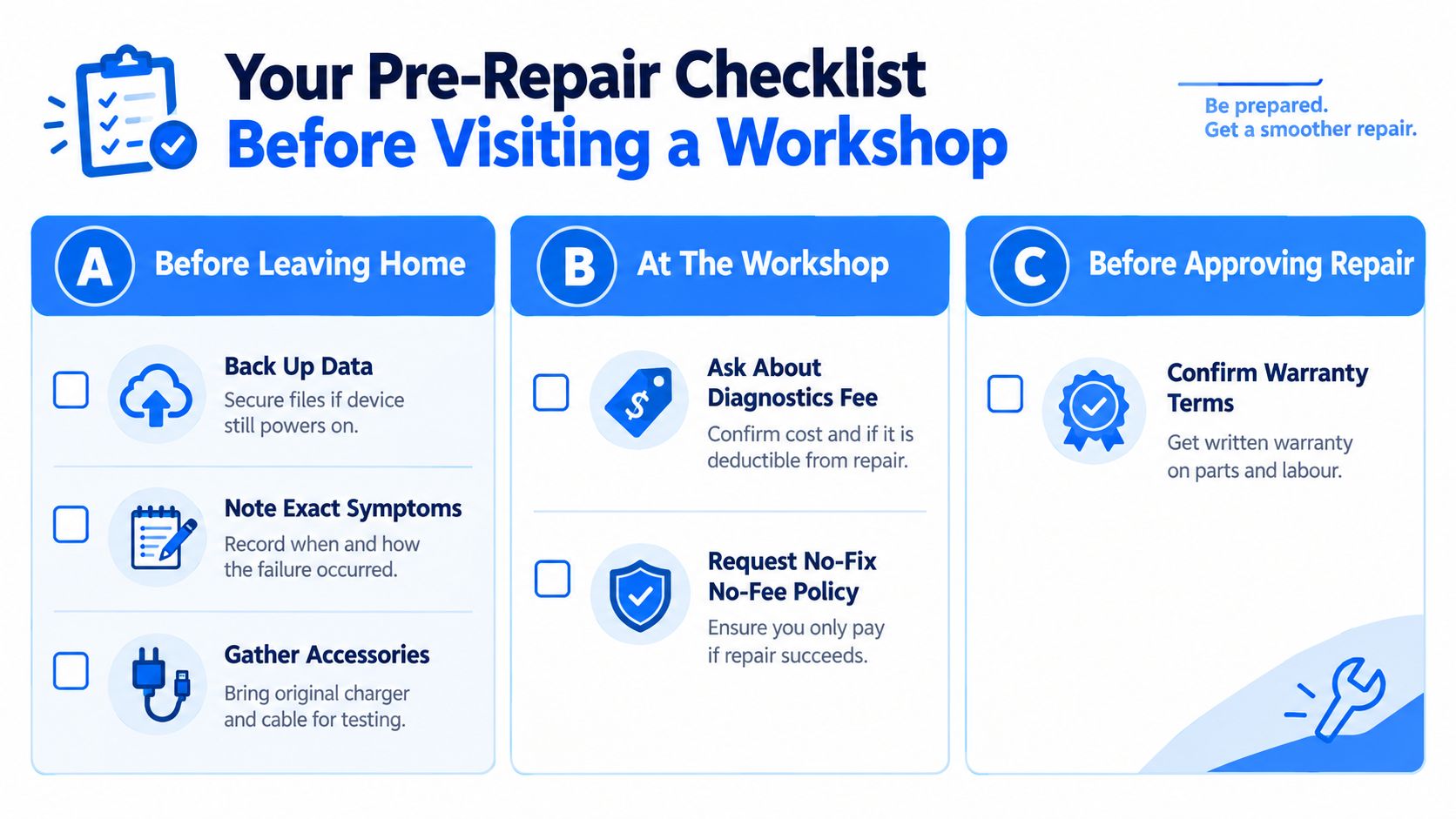
For Sheffield customers, Steel City IT offers logic board diagnostics and precision micro-soldering for computer, laptop and console faults, including power, charging and liquid-damage problems. Bring the device, charger and a clear failure history so the workshop can assess whether component repair is sensible before you commit to a full board replacement or a new machine.
