
Sheffield Computer Services: Repairs, Upgrades & Custom

You usually notice the problem at the worst possible time. The laptop won't wake up before a client call, the gaming PC starts throwing strange display errors, or a hard drive begins clicking in a way that makes your stomach drop. At that point, the key question isn't just who can fix it, it's what can be repaired, what data is still salvageable, and when replacement is the smarter call.
Sheffield has a long-running computer-services scene, and that matters more than many realise. CBC Computer Systems Ltd was incorporated on 23 December 1985 and later based at Redwood House, 68 Brown Street, Sheffield, S1 2BS, while its own history page says it was founded in December 1985 and moved back to Sheffield in 2004 after earlier expansion in Doncaster and Huddersfield. That kind of continuity shows that sheffield computer services have been part of the city's business fabric for decades, not a passing trend, and it helps explain why local workshops still handle jobs that national chains often decline.

Table of Contents
Full Range of Repairs, Upgrades and Custom Builds Available - Hardware repair and software recovery - Upgrades, custom builds and gaming systems - Data recovery and console work
Board-Level Micro-Soldering and GPU Repair Explained - What board-level repair actually means - GPU faults that deserve diagnosis - When micro-soldering is worthwhile
How the Repair Process Works from Drop-Off to Collection - What good intake looks like - What happens after diagnosis
Trust Signals Parts Policy, Genuine Components and Transparency - What to look for
Frequently Asked Questions About Sheffield Computer Services
Why Local Computer Repair Expertise Matters in Sheffield
A dead laptop looks like a dead laptop from the outside. In the workshop, though, the difference between a charging fault, a failed storage drive, and a board-level power issue can be the difference between a quick recovery and a total replacement. That's why local expertise matters, especially in a city where customers bring in work machines, family laptops, consoles, and gaming PCs with very different failure modes.
Sheffield's repair market has depth, not just variety. Sheffield Computer Services reports more than 1,000 computer repair, tuition, and website jobs completed over a three-year period after starting in April 2012 and moving to Sheffield in May 2015, with its listed address at 8 Sycamore Street, S20 5AW, Sheffield. That kind of volume points to a market that needs more than basic swap-out service, it needs diagnostics, upgrades, data handling, and practical judgement. The city also has a digital-inclusion focus in its Digital Connectivity Strategy 2019 to 2021 from Sheffield City Council, which underlines why reliable devices matter for work and everyday access. See the Sheffield computer shops overview for a useful local-market snapshot.
Practical rule: if a workshop can only quote for full part replacement, it's not giving you the full picture.
A good local technician should be able to tell you what failed, what can be tested, and what can be preserved. That's especially important when the device contains files you can't replace, or when the fault is small enough that a targeted fix makes more sense than a full rebuild. In practice, the best outcome often comes from a workshop that can separate storage faults, software corruption, power problems, and component-level damage before any money changes hands.
The main advantage of Sheffield-based repair is simple. You can take a failing device to someone who knows the difference between a routine service call and a deeper electronics fault, and that shortens the path to the right decision. That's the value of local expertise, better diagnosis first, then the right repair path second.
Full Range of Repairs, Upgrades and Custom Builds Available
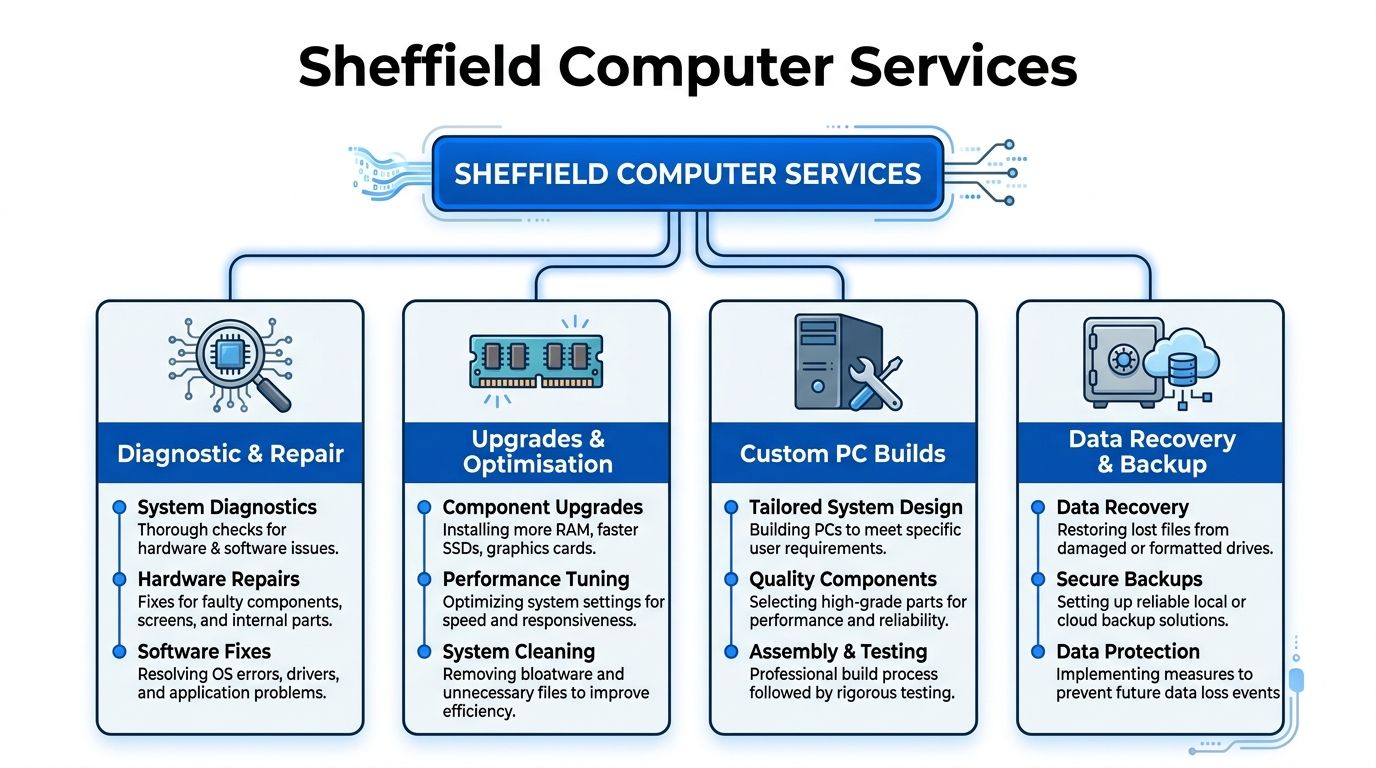
The strongest Sheffield workshops don't just “fix computers”. They handle problems in layers, starting with diagnosis, then moving into the least disruptive repair that will hold up in real use. That matters because a machine that seems broken can often be rescued without wiping it, and a machine that seems slow may need storage or memory help rather than replacement.
Hardware repair and software recovery
Hardware repair covers failed power sockets, damaged charging circuits, broken ports, and other faults that stop a device from starting or behaving reliably. On the software side, the job is usually less dramatic but just as important, cleaning out malware, fixing corrupted system files, or carrying out a clean Windows reinstall with drivers and updates configured properly. A proper reinstall is not just a wipe, it should leave the machine usable, stable, and correctly set up for the hardware inside it.
Clean software work only helps if the underlying device is stable enough to benefit from it.
If the issue is a noisy fan, overheating, random crashing, or a system that won't boot consistently, the right workshop should test before guessing. That avoids the common mistake of reinstalling Windows on a machine that has a dying drive or a power problem.
Upgrades, custom builds and gaming systems
A lot of local “slow PC” jobs are upgrade candidates rather than repair disasters. SSD upgrades, RAM upgrades, and cooling improvements often make the biggest difference in day-to-day responsiveness, especially when the original machine is still mechanically sound. For gamers and enthusiasts, custom PC builds are a separate service class, not just a prettier version of a standard desktop, because balancing the PSU, memory stability, airflow, and graphics demand matters far more than picking one expensive part.
Sheffield-based custom builds should be configured for the user, not for a parts list. A student, a remote worker, and a gamer all need different things from storage, noise levels, and thermals, even when the case looks similar.
Data recovery and console work
Data recovery is its own discipline. It should focus on controlled handling, drive health, and whether cloning or recovery attempts are safe before the failing drive is pushed any harder. That's especially important when a drive is unstable but still readable, because the wrong intervention can turn a recoverable file set into a partial loss.
Console repair sits alongside PC repair in Sheffield's market as well. Faults like HDMI damage, overheating, and power issues need inspection at the board and port level, not a generic reset. For gamers, that distinction matters because a console that won't display may not need replacement at all, it may need the port, the power path, or related electronics restored properly.
Board-Level Micro-Soldering and GPU Repair Explained
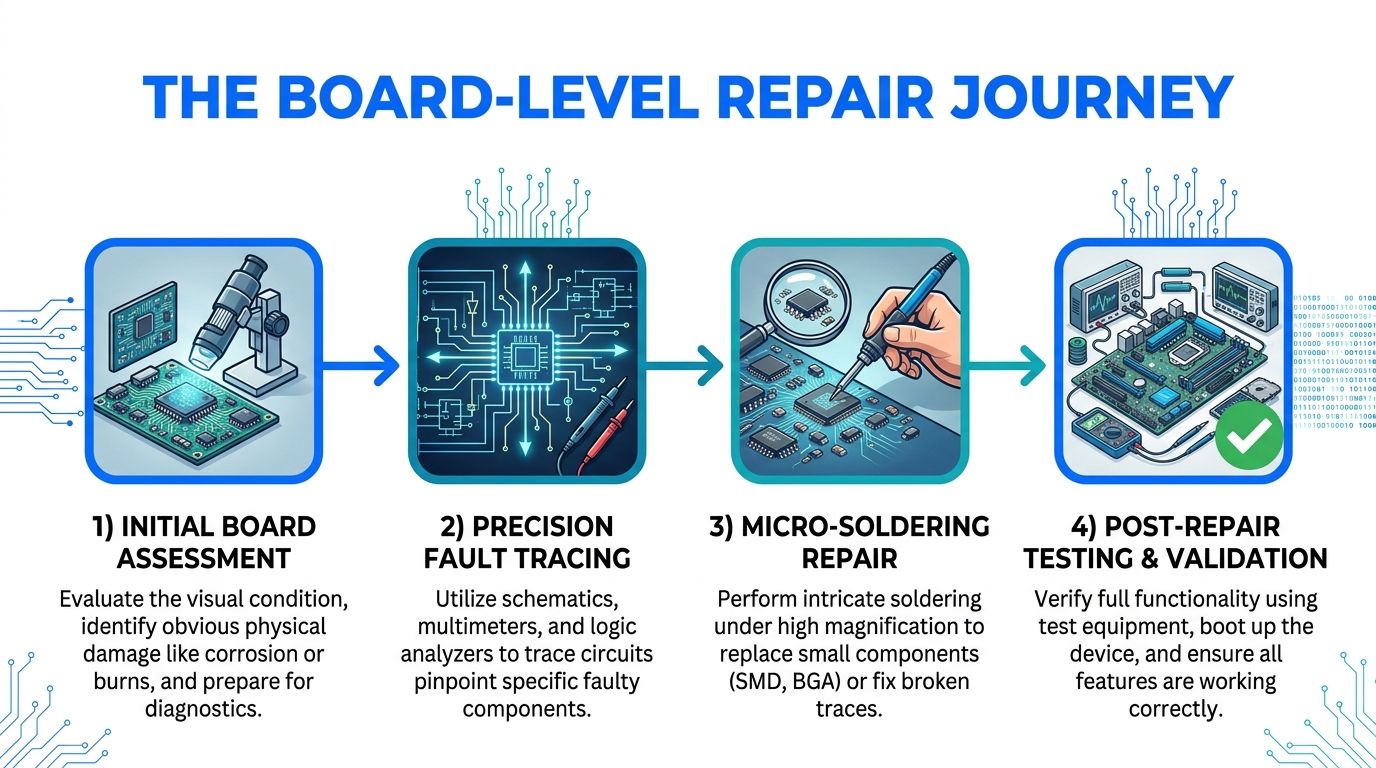
Steel City IT's GPU repair discussion is useful because it points at the core issue many overlook: a graphics card is not just “working” or “dead”. Many faults sit at component level, where diagnosis decides whether repair is sensible at all.
What board-level repair actually means
Board-level repair is the difference between swapping parts and understanding the circuit. A technician traces power rails, charging paths, and signal behaviour, then repairs the point of failure with precision micro-soldering instead of replacing a whole logic board or card. That approach matters most for liquid damage, no-power faults, and charging failures, where the visible symptom is often far removed from the actual fault.
Experience counts. A bad connector, a failed protection component, or a damaged trace can stop a machine completely, yet the rest of the board may still be healthy. Replacing the full board for that kind of fault is often wasteful.
GPU faults that deserve diagnosis
Graphics cards present in more than one way when they fail. Artifacting, driver crashes, and no-display conditions can point to VRAM trouble, power-rail instability, or degraded solder joints, not necessarily a card that belongs in the bin. That's why component-level diagnostics matter for NVIDIA RTX and AMD cards, especially when the card is otherwise a high-value part of the system.
A good repair shop doesn't promise miracles. It tests, isolates, and explains whether the card is suitable for micro-soldering work, then compares that route with replacement. For some users, especially gamers and creators, that decision can save an expensive component from being discarded too early.
When micro-soldering is worthwhile
The right candidate is usually a board that has a clear fault, identifiable damage, and a reasonable chance of stable recovery. If the damage is widespread, or if the board has already been poorly repaired, full replacement may be the cleaner option. The practical advantage of a proper Sheffield workshop is that it can tell you which side of that line your device sits on before you commit to spending.
Repair or Replace Making the Right Decision for Your Device
The repair-versus-replace question usually gets answered too late. People bring in a machine after trying three random fixes, then discover the actual issue was storage, data value, or a component fault that should have shaped the decision from the start. The better approach is to match the problem to the likely cause before you spend on parts.
Problem | Likely Cause | Recommended Action | Typical Outcome |
|---|---|---|---|
Slow laptop with plenty of life left | Storage bottleneck, software clutter, or memory pressure | Test the drive, clean the system, then consider SSD and RAM upgrades | Faster booting, better responsiveness, less stutter |
Laptop won't power on | Charging circuit fault, board-level damage, or failed power path | Diagnose before replacement, especially if data matters | Possible recovery without full system replacement |
Failing hard drive with important files | Mechanical wear or file-system corruption | Prioritise data recovery or cloning before any reset | Files preserved when handled early enough |
Gaming GPU showing artefacts or crashes | VRAM, solder, or power instability | Compare component-level repair against replacement | Card may be restored instead of discarded |
Machine is physically damaged beyond practical repair | Severe board damage or multiple failing subsystems | Replace, but only after checking whether data can be copied | New hardware with files recovered first |
A slow PC is not always a dying PC. In a lot of cases, the storage is the bottleneck, the system is bloated, or the memory is being overused, and that can be improved without replacing the whole unit. That's why SSD upgrades and RAM upgrades are so common in serious repair work, they target the friction points instead of masking them.
Data changes the equation. A cheaper replacement can become expensive if the old machine holds business records, family photos, or project files that aren't backed up anywhere else. If the drive is still readable, it can be smarter to clone or recover the data first, then decide whether the rest of the machine is worth saving.
For GPUs, the same logic applies. A card with intermittent faults may be repairable at component level, while a completely dead card with extensive damage may be a poor candidate for workshop time. The point is not to avoid replacement at all costs, it's to avoid paying for replacement when a targeted repair would have delivered the same working outcome.
How the Repair Process Works from Drop-Off to Collection
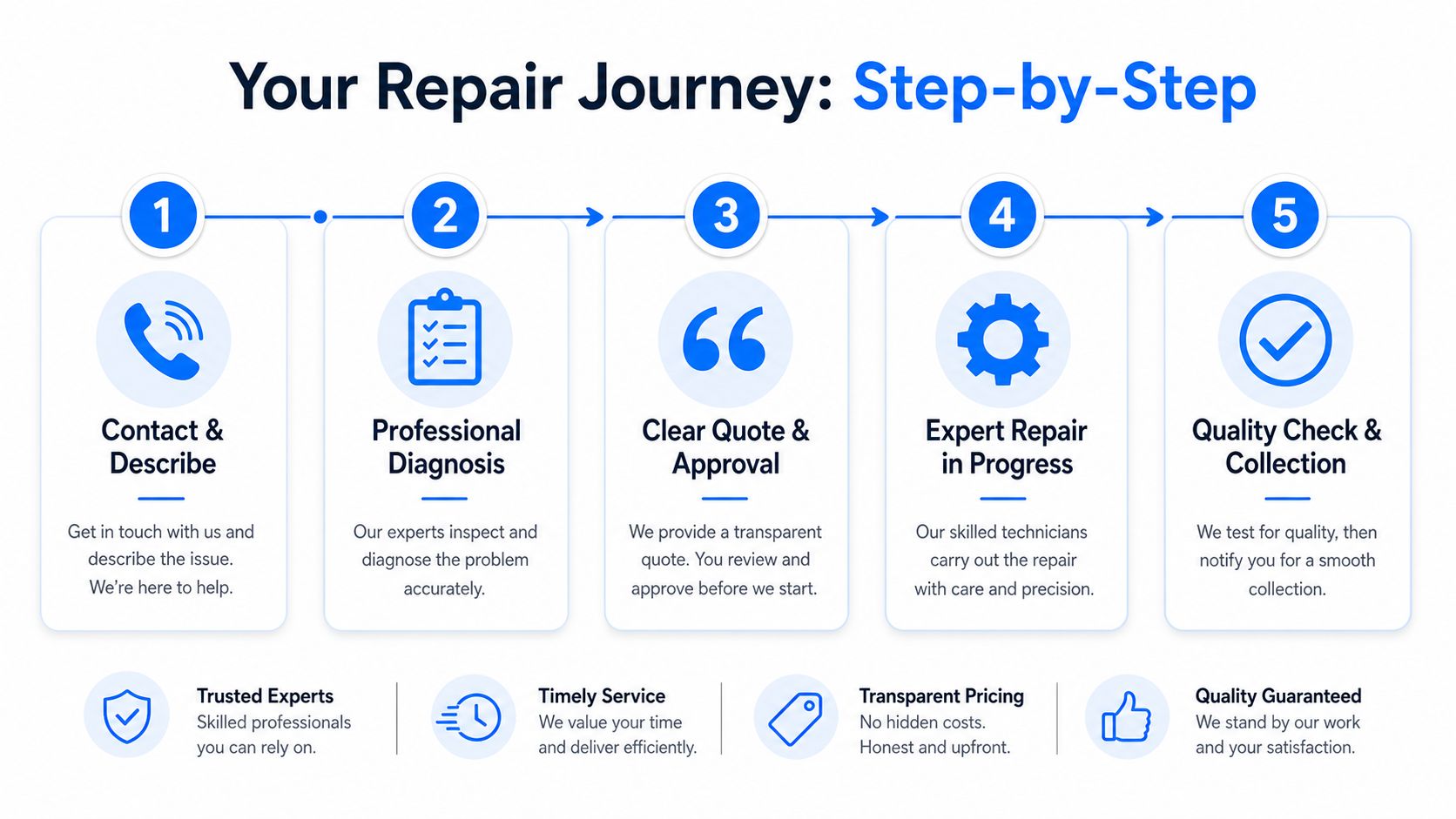
Everyone wants the same thing from a repair job: a clear answer, a fair quote, and no surprises. That starts with the first conversation, because the way you describe the fault affects how quickly a technician can narrow it down. “Won't turn on” is useful, but “won't power on after a charger sparked” tells the workshop much more.
What good intake looks like
The best repair process starts with a short history of the fault, any recent spills or drops, and whether the device still shows signs of life. If the machine has important files, say that immediately, because it changes the order of operations. A workshop that understands priorities can choose the safest diagnostic route first, instead of rushing into a reinstall or reset.
That same principle applies across Sheffield, including customers coming in from Frecheville, Birley, Hackenthorpe, and Woodhouse. Workshop-based repair works best when the device can be examined properly rather than treated like a quick guess job.
What happens after diagnosis
Once the fault is identified, the workshop should explain the issue in plain language and set out the options. A good technician doesn't just say something is broken, they tell you what failed, what it affects, and what the practical fix is. If the problem is simple, the repair may be straightforward. If it's board-level or data-sensitive, the explanation should be more cautious and specific.
Ask for the diagnosis in normal language, not just a parts list.
Turnaround depends on the fault, but a competent local shop should usually keep you updated and tell you when the repair is in progress, delayed, or complete. Collection or delivery should come only after the device has been tested, because a repair that hasn't been validated is just a hope with a receipt attached.
Trust Signals Parts Policy, Genuine Components and Transparency
Trust starts with parts policy. Cheap counterfeit components can create repeat faults, introduce instability, and sometimes cause damage beyond the original problem. That's why the question isn't just whether a workshop can replace something, it's whether it uses components it's willing to stand behind.
The best Sheffield technicians are open about what was fitted, why it was chosen, and what the risks were. They don't hide behind vague wording or bundle several issues into one unexplained bill. They also make clear when a repair is a sensible route and when it's not, which is a sign of honesty, not weakness.
A soldering-focused Sheffield service note is a good reminder that advanced repair work depends on more than tools. It depends on judgement, visible workmanship, and the ability to explain the fault in a way that helps the customer make a decision.
What to look for
Clear fault explanation: You should hear what failed, not just that something is “faulty”.
Named parts policy: Genuine components should be preferred where quality and compatibility matter.
Reasoned repair advice: The shop should tell you when repair makes sense and when replacement is more practical.
Visible care with the device: Careful handling during intake, testing, and return is a basic standard, not an extra.
Local accountability: Sheffield workshops rely on reputation and repeat custom, so consistent outcomes matter.
Community-rooted repair businesses tend to earn trust the hard way. They do it by getting diagnostics right, keeping communication open, and avoiding the temptation to oversell a repair that won't last. That's the standard worth looking for when you hand over a laptop, console, or gaming PC.
Frequently Asked Questions About Sheffield Computer Services
Is my data safe during a Windows reinstall or SSD upgrade?Not automatically. If the drive is healthy and the work is planned properly, data can often be preserved or moved first, but a failing drive should be handled carefully before any reinstall or migration. If the files matter, make that the first conversation.
What should I do first after liquid damage?Power the device off and leave it off. Don't keep trying to boot it, because repeated power attempts can worsen board damage and reduce the chance of a clean repair.
Can an HDMI port on a console be repaired?Often, yes, if the port or surrounding board damage is the actual fault. The more important question is whether the damage is isolated enough for a worthwhile repair, which is why diagnosis comes before any promise.
How should I prepare a device before bringing it in?Note the symptoms, when they started, and anything that happened just before the fault. If you can, include charger details, recent drops, spills, or any error messages, because that saves time during diagnostics.
If you need straightforward diagnostics, component-level repair, data recovery triage, or a build that's matched to how you use your machine, Steel City IT handles those jobs from its Sheffield workshop. Visit Steel City IT if you want a local technician to assess the fault, explain the options clearly, and help you decide whether repair or replacement makes more sense.
