
Console Repair Guide for Sheffield Gamers

A lot of console failures happen at the worst possible moment. You're mid-match, mid-checkpoint, or halfway through a download you've already waited all week for, then the screen cuts to black, the controller stays lit, and your first thought is usually not calm or technical.
The same fast checklist gets run. Try another HDMI input. Swap the cable. Power-cycle the console. Hold the button longer. Wonder if it's the TV. Hope it's just a handshake issue and not the console itself. Sometimes that works. Sometimes it doesn't, and that's the point where guesswork starts getting expensive.
A proper console repair process is less dramatic than the fault itself. It starts with ruling out the obvious, then separating a simple external issue from a board-level fault inside the machine. That difference matters. A bad cable, a tired fan, a loose drive, and a torn HDMI socket can all produce “no picture” in slightly different ways, but they don't belong in the same repair category.
The calm approach is usually the cheapest one. Note what happened just before failure. Did the console shut down under load, or did the image cut while power stayed on? Did the port feel loose? Did the fan get louder over the last few weeks? Those details save bench time and help a workshop aim straight at the likely fault instead of starting from zero.
Table of Contents
When Your Console Lets You Down - The first checks that are worth doing
What Console Repair Actually Involves - The main categories on the bench - Why some jobs are quick and others are not
The Faults Sheffield Gamers Bring In Most - HDMI faults - Overheating and shutdowns - Power and boot faults - Drives controllers and handheld faults
Board-Level Repair Versus Parts Replacement - What changes between the two - Why the quote tells you a lot
Turnaround Times Costs and Warranty Expectations - What the UK market tells us about pricing - What affects turnaround in practice - What warranty language should look like
When Repair Makes Sense and When It Does Not - When repair usually wins - When replacement is the better call
Your Consumer Rights Before You Book a Repair - When the seller is responsible - What helps your claim - Where people get this wrong
Choosing a Repair Shop You Can Trust - What to listen for - Minimum standards worth insisting on
When Your Console Lets You Down
Saturday evening is when this usually lands. A PS5 freezes on a checkpoint, the display drops to black, and the controller still has power. You pull the HDMI lead, plug it back in, stare at the screen, and listen for the fan. If the console still boots but the TV says no signal, your mind jumps between two possibilities at once: something simple on the outside, or something soldered to the motherboard.
That split-second decision tree is familiar because the symptoms overlap. A faulty cable can mimic a damaged HDMI port. A bad TV input can look like a dead graphics path. A console that overheated earlier in the week might now fail on startup because heat has already stressed another area inside the chassis. The first ten minutes after a fault are where people often make things worse by forcing ports, repeatedly hard-cutting power, or assuming a random internet fix applies to their model.
The first checks that are worth doing
Before anyone reaches for tools, gather evidence.
Swap the obvious first: try a known-good HDMI cable and another display input.
Watch the power behaviour: note whether the console shows a light, beeps, spins the fan, or shuts off straight away.
Check the port gently: if the HDMI socket feels loose or the cable droops, don't keep pushing it in.
Listen for changes: loud fan ramping, clicking from a disc drive, or repeated on-off cycles all point in different directions.
Those details change the whole repair path. “Powers on but no image after someone tripped over the cable” points one way. “Runs for a while, gets hot, then shuts down” points another.
A structured fault note from the customer often cuts out half the dead ends in diagnosis.
There's also a practical reason not to rush. In the UK, some faults shouldn't go to an independent workshop first at all if the console was bought recently. Retailer responsibility can matter more than repair skill in the early window after purchase, and that gets missed all the time when people panic-book the first available service.
Console failure rarely arrives at a convenient moment. That's exactly why a methodical first assessment beats trial-and-error every time.
What Console Repair Actually Involves
Console repair isn't one job. It's a stack of different jobs that happen on the same bench.
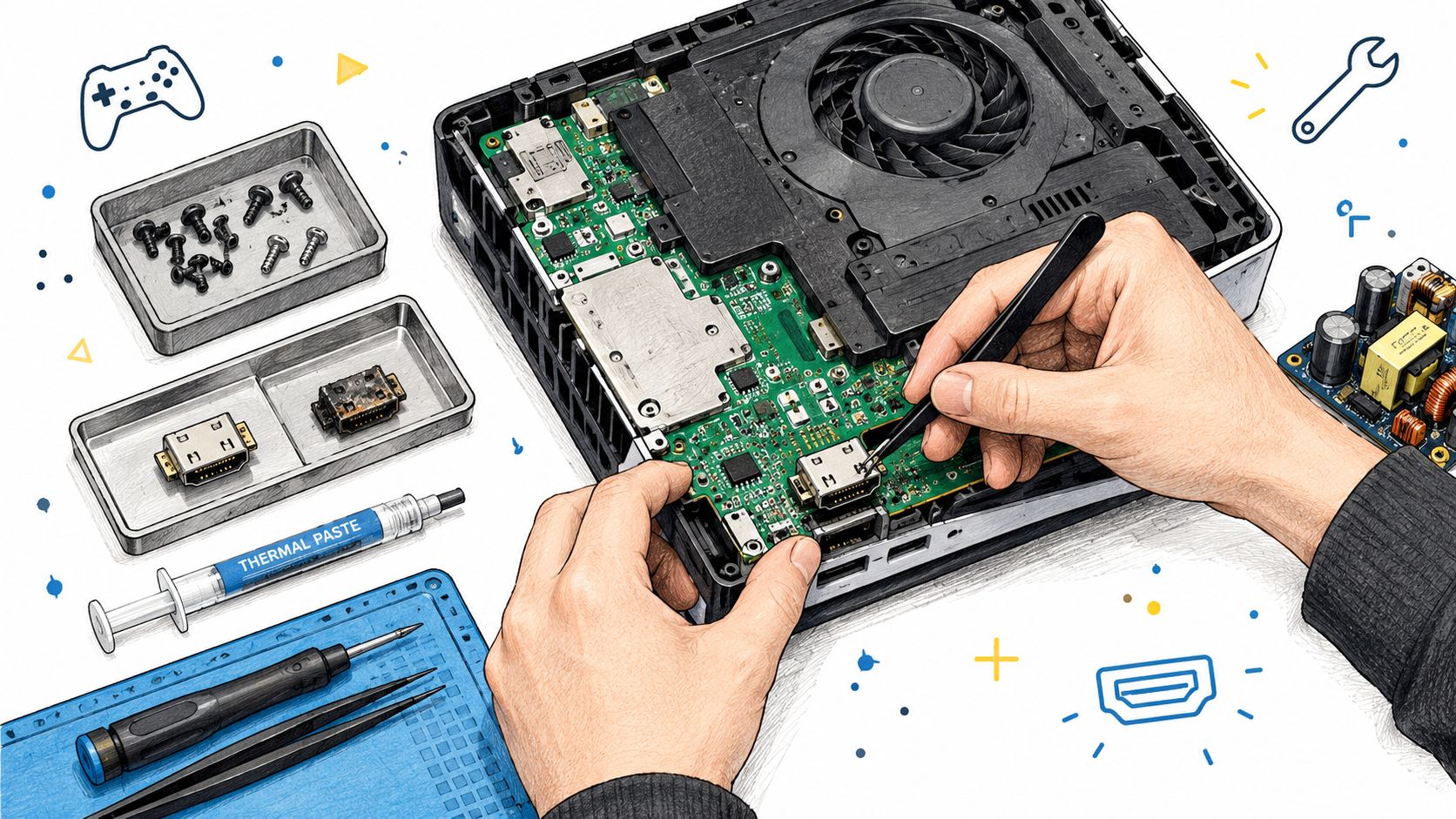
A workshop usually works across three layers. First comes diagnostics, where the fault gets identified rather than guessed. Then there's parts fitting, where modular components such as fans, drives, or power supplies are replaced. Finally there's board-level work, where the technician is repairing the motherboard itself under magnification with hot air, flux, solder wick, tweezers, and a microscope.
The main categories on the bench
The easiest way to understand console repair is by fault type.
HDMI socket work: bent pins, crushed shells, or sockets torn loose from the board. This is not a cable job. It's micro-soldering.
Power-stage repair: the console clicks, flashes, or refuses to boot. That often means tracing rails and checking shorted components rather than replacing a random module.
Thermal servicing: dried paste, clogged heatsinks, and restricted airflow. The repair is cleaning, repasting, reassembly, and temperature validation.
Disc drive faults: more common on older systems, where laser or mechanical wear causes read errors or grinding.
Liquid or corrosion damage: this is the messy end of the trade. It can involve ultrasonic cleaning, track repair, and replacing damaged components one by one.
What the customer hands over is the whole machine and the fault description. What stays in the workshop is everything else: donor parts, matched sockets, consumables, anti-static handling, and the test gear needed to prove the fix.
If you're shipping a console rather than dropping it off, good packing matters more than people think. The wrong wrap can turn a survivable fault into a static or impact problem in transit, so it's worth knowing how to find anti static bubble wrap for dispatch before the box is sealed.
Why some jobs are quick and others are not
A fan swap can be straightforward once the unit is open. A motherboard fault can take a full bench session before the actual repair even starts. That's because the time isn't only in fitting the part. It's in confirming the fault path, checking for secondary damage, and making sure the console survives testing afterwards.
Here's a look at the kind of workbench process people rarely see from the customer side:
A good workshop doesn't just “replace the bit that looks broken”. It proves why the fault happened, because that's what stops the same console coming back with the same symptom.
The Faults Sheffield Gamers Bring In Most
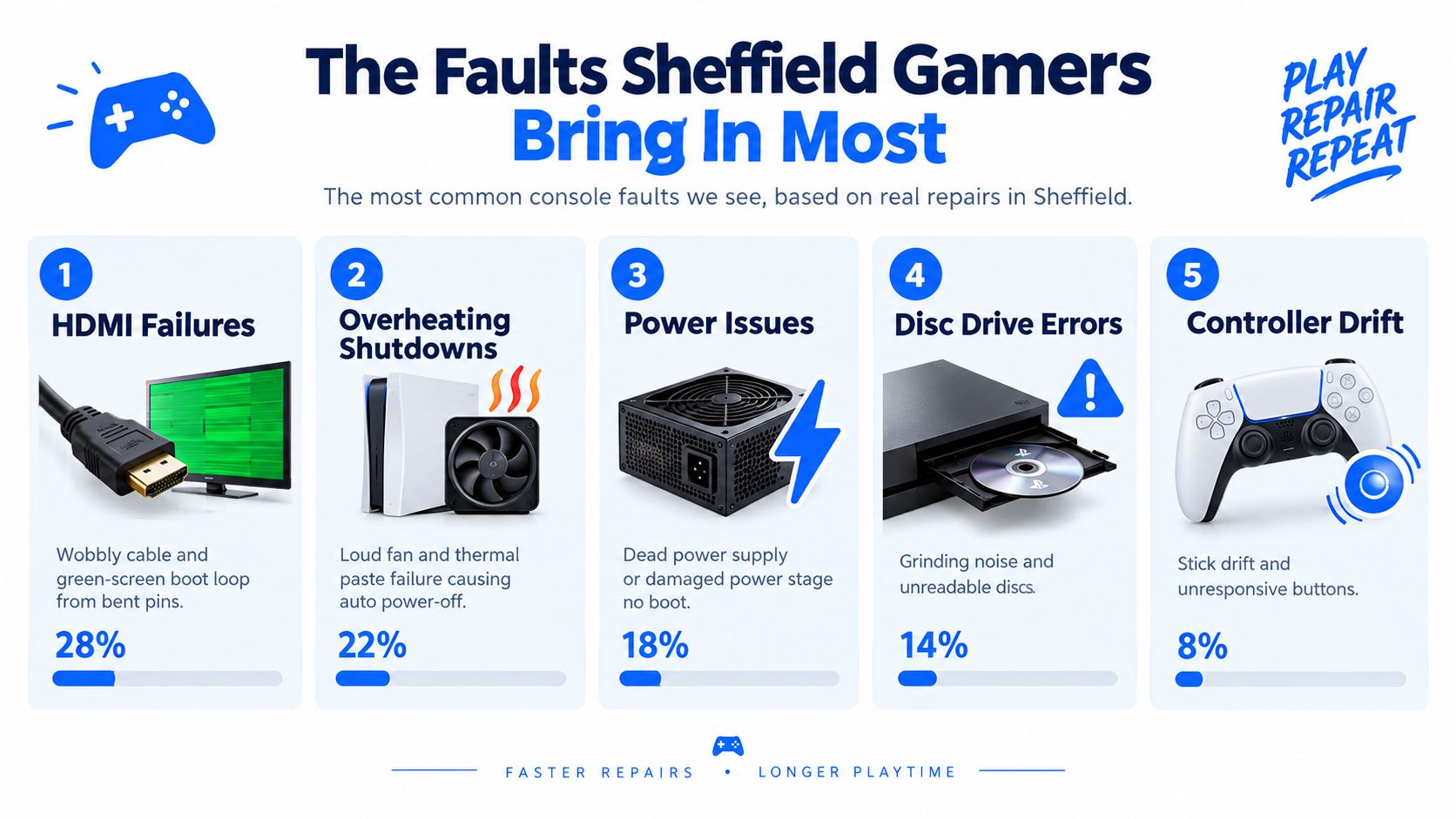
Some faults repeat because consoles fail in predictable places. The socket that gets yanked. The cooling path that fills with dust. The power section that absorbs every surge, bad shutdown, and heat cycle. Once you've seen enough machines opened up, patterns stop being surprising.
HDMI faults
This is one of the most common modern console jobs. The symptom is usually simple. No signal, flickering image, intermittent picture when the cable moves, or a port that feels visibly loose. The cause is less simple because the HDMI connector is mounted directly to the board, so proper repair means desoldering the damaged socket, checking pads and traces, and fitting a matched replacement under a microscope. Published UK repair pricing commonly sits around £69 to £89 for HDMI port work, which reflects the labour and precision involved rather than the cost of the metal socket alone (UK HDMI repair pricing guidance).
Overheating and shutdowns
The noisy console that sounds fine at idle but roars during a game usually has a thermal problem, not a mystery software issue. UK repair guidance consistently links loud fan behaviour, shutdowns, and unstable performance to dust, airflow restriction, and degraded thermal paste, with the repair involving full disassembly, deep cleaning, and repasting. That work commonly takes around 2 to 4 hours and often reduces noise straight away when the rest of the hardware is healthy (UK overheating repair guidance).
Workshop note: If a console shuts down under load, testing only the fan isn't enough. The whole thermal path has to be checked.
Power and boot faults
A dead console can still have several different failures underneath the same symptom. Some units show no light at all. Some click on and off. Some charge but never wake. On the bench, the difference shows up through rail checks, current draw behaviour on a bench supply, and thermal inspection for components that heat where they shouldn't.
That's why a “no power” quote without diagnosis is often meaningless. Power faults range from a replaceable module to a deeper motherboard issue.
Drives controllers and handheld faults
Disc drive errors still come in, particularly on systems that have had heavy use or poor storage conditions. You also see pairing faults, stick drift, and damaged charging circuits on handhelds and controllers. Those jobs sit lower on the risk scale, but they still need proper diagnosis because a symptom at the controller can start at the console.
For Switch owners, the repair path often depends on whether the issue sits with charging, the game card reader, cooling, or physical damage to the USB-C area. A more model-specific overview helps if you need Nintendo Switch repair guidance.
Board-Level Repair Versus Parts Replacement
Not every quote is talking about the same type of work. Two shops can both say they do console repair while offering completely different repair depth.
Parts replacement means swapping a whole assembly. Board-level repair means saving the original board by repairing the failed area on it. The tools, skill level, and risk are different, and the quote usually reflects that.
What changes between the two
Aspect | Parts Replacement | Board-Level Repair |
|---|---|---|
What gets replaced | A full module such as a fan, drive, or power unit | Individual ports, chips, caps, filters, pads, or traces |
Main tools used | Hand tools, test rig, standard fitting equipment | Microscope, hot air station, soldering iron, flux, wick |
Diagnosis depth | Usually confirms a failed assembly | Tracks the fault to a specific circuit area |
Typical risk | Lower if the part is clearly bad | Higher because the motherboard itself is being reworked |
Best use case | Modular faults with good parts availability | HDMI damage, short circuits, corrosion, and fine-pitch faults |
What a cheap quote can mean | Basic swap with limited testing | Possible shortcuts if the job actually needs micro-soldering |
An HDMI port is the cleanest example. It may look like a small external fitting, but it's soldered directly to the mainboard. If the shell is bent or the pins are damaged, there is no proper “push in a new one” shortcut. The old port has to come off cleanly. Pads have to be inspected. Lifted traces may need repair before the new socket goes on.
Why the quote tells you a lot
A low quote isn't automatically bad, but it can be a warning if the fault clearly needs microscope work. Proper board-level repair takes time because the technician has to protect nearby components, control heat, inspect alignment, and test the output after rework. That's not the same service as fitting a drop-in part.
If a shop can't explain whether your job is a module swap or board repair, they probably haven't diagnosed it properly.
For readers who want a closer look at what component-level bench work involves, this overview of micro-soldering repair shows the kind of faults that sit beyond basic parts swapping.
Turnaround Times Costs and Warranty Expectations
Three things get asked first. How long will it take, what will it cost, and what happens if the same fault comes back. Those are the right questions, but the honest answer depends on the repair category, parts supply, and whether diagnosis finds more than one issue.
What the UK market tells us about pricing
Current UK repair-price guides put most console repairs in a broad range of about £39.95 to £129.95, with HDMI port repairs commonly around £54.95 to £84.95, PS5 repairs often quoted at £59 to £129, and controller stick-drift fixes as low as £25 to £45 (UK console repair price guide). Those figures are useful as a rough market check, not as a promise that every fault fits neatly into a price list.
A competent workshop will usually separate the jobs that are predictable from the ones that need a bench diagnosis first. Thermal servicing and straightforward controller work are often easier to cost early. Intermittent boot faults and liquid-damaged boards are not.
What affects turnaround in practice
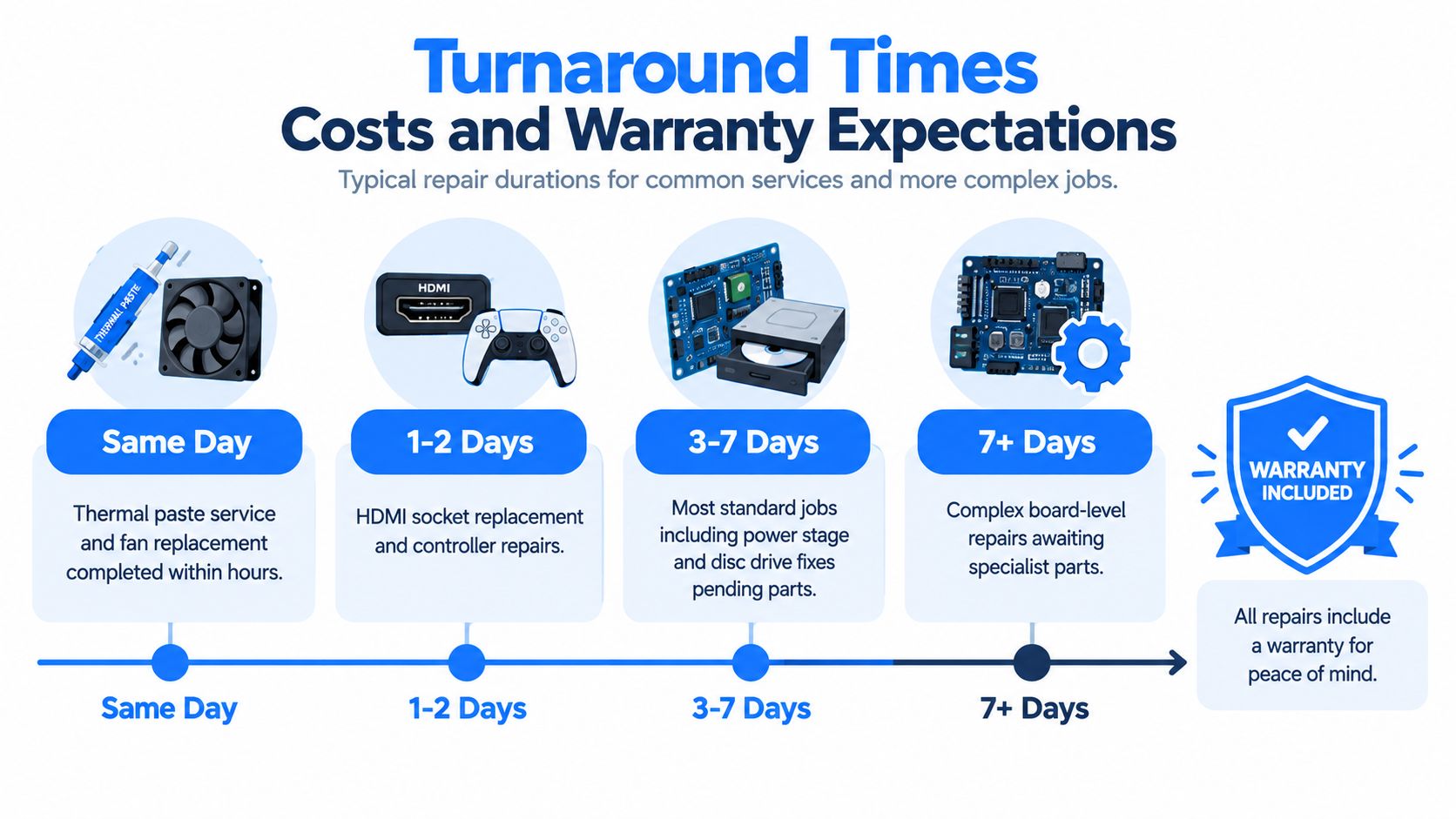
Turnaround is rarely about the screwdriver time. It's usually about fault confirmation and parts.
Fastest jobs: cleaning, thermal work, and some controller repairs if the parts are already in stock.
Mid-range jobs: HDMI socket replacement and standard internal component swaps once the exact revision is confirmed.
Longest jobs: complex board-level faults, corrosion cases, and anything waiting on a less common donor part.
A workshop that handles consoles alongside deeper electronics work, such as Steel City IT, will often diagnose whether the job belongs in the parts-swap lane or the micro-soldering lane before locking in the final path. That's a better sign than quoting a fixed number for every no-power fault on the phone.
What warranty language should look like
Good warranty terms are specific. They should state what fault is covered, whether parts and labour are both included, and what breaks that cover. Physical impact, liquid ingress after repair, and unrelated future faults are commonly excluded, and that's reasonable if it's written clearly.
Ask these before booking:
Is diagnosis charged separately, and is it deducted from the repair if approved?
Is the quote fixed, or can it change after strip-down?
If the same fault returns, what happens next?
Does the warranty cover the exact repaired fault only, or the full device?
Clear answers matter more than a dramatic promise. If the wording is vague, the aftercare usually is too.
When Repair Makes Sense and When It Does Not
There's no point pretending every console is worth saving. Some are. Some aren't. The honest decision usually comes down to the relationship between the repair quote and the replacement value of the device.
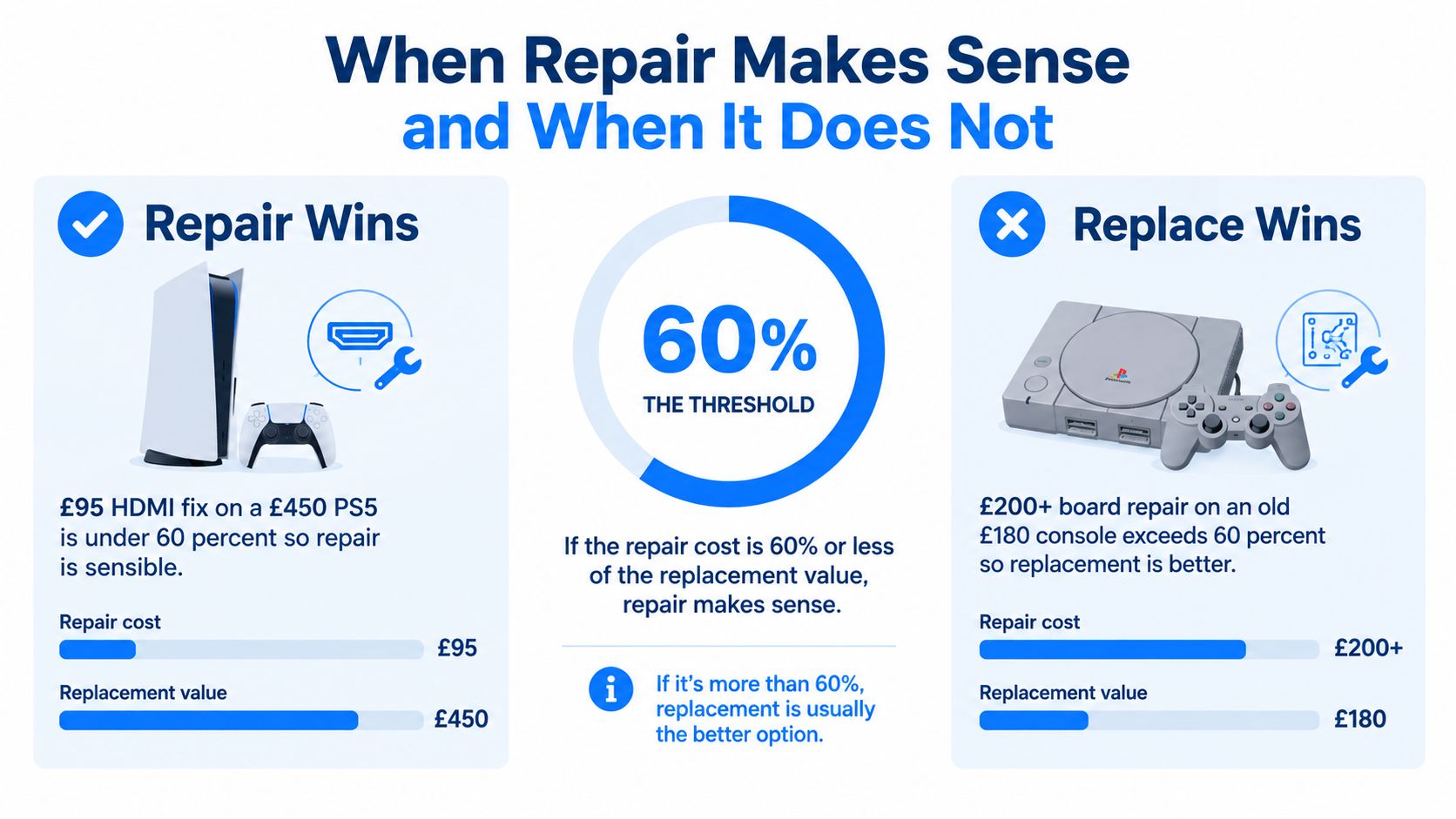
A useful workshop rule is the 60% threshold. If the repair is comfortably under about 60% of the cost of a like-for-like replacement, repair often makes sense. If it's pushing beyond that, you need a stronger reason to proceed, such as saved data, a special edition unit, or a fault on otherwise expensive current-generation hardware.
When repair usually wins
A £95 HDMI fix on a £450 PS5 is a sensible repair. The machine still has strong replacement value, the fault is common, and the repair target is clear. The same logic applies when the console is mid-generation, the history is clean, and the failed part is known to be serviceable.
Repair also makes sense when:
The fault is contained: one known issue, no signs of liquid spread or previous botched work.
The console is otherwise healthy: no overheating history, no heavy corrosion, no major cosmetic abuse.
The repair is well understood: HDMI damage, thermal servicing, some power-supply faults, and controller issues often fit this category.
When replacement is the better call
A £200+ board repair on an old £180 console usually doesn't stack up. At that point, the customer is paying for a difficult fault on ageing hardware with weaker parts support and less certainty after the repair.
Don't judge only by whether a console can be repaired. Judge by whether the result is worth owning afterwards.
Replacement also starts to look smarter when the board has liquid damage across several zones, someone else has already attempted a failed board-level repair, or the machine is old enough that several wear-related problems are arriving together. Clicking drives, tired storage, brittle plastics, and repeated thermal history all push the value equation in the wrong direction.
The repair industry context in the UK is large enough that these decisions matter beyond one machine. The UK Computer and Computer Equipment Repair industry is estimated at £4.0bn in 2026, and the related Consumer Electronics Repair industry grew at a 4.8% CAGR between 2019 and 2024. At the same time, Virgin Media O2 reported around 18 million unused consoles in UK homes in 2024 and around 49 million unused consoles by 2026, which shows how many devices sit repairable or refurbishable rather than being used or recycled (UK repair market context and unused console figures).
Your Consumer Rights Before You Book a Repair
A lot of people pay for a repair they might not have needed to fund themselves. That usually happens because they treat the workshop as the first stop, when the retailer should have been the first conversation.
When the seller is responsible
In the UK, if a console is faulty, the legal route often starts with the seller rather than the repair shop. You can usually reject faulty goods within 30 days, ask for a repair or replacement from 30 days to 6 months, and still pursue repair, replacement, or other remedies after 6 months, with the seller generally carrying the responsibility rather than an independent workshop (UK returns and refunds guidance).
That matters most for expensive current-generation consoles. If the unit failed soon after purchase and there's no sign of accidental damage, paying an outside technician first can weaken your practical position with the retailer.
What helps your claim
Gather the boring evidence before anyone opens the casing.
Keep the proof of purchase: receipt, order email, finance record, or bank statement.
Photograph the condition: especially ports, seals, casing, and packaging if the fault appeared early.
Record the symptom: a short clip of the boot loop, no-signal fault, or shutdown behaviour helps.
Describe the timeline clearly: when it was bought, when the fault first appeared, and whether there was any impact or liquid exposure.
Where people get this wrong
The common mistake is assuming every hardware failure belongs to the repair trade first. It doesn't. If the issue appeared soon after sale, ask whether it's a retailer-liability problem before paying for diagnostics elsewhere. Independent repair becomes the right route when the statutory path is exhausted, the damage is accidental, or the owner wants the fastest practical fix outside the return process.
The other mistake is blurring warranty, goodwill return, and legal rights into one thing. They aren't the same. A manufacturer guarantee, a shop's return policy, and your statutory rights each run on different rules. Keeping them separate usually leads to a better outcome.
Choosing a Repair Shop You Can Trust
A decent repair shop should sound organised before you ever hand over the console. Ask whether diagnosis carries a fee, whether that fee comes off the final bill, and whether the quote is fixed or can change after strip-down. If the answers are vague on the phone, they're often worse once the unit is on the bench.
What to listen for
A proper board-level workshop should be able to tell you whether they do microscope and hot-air work in-house, or whether they only replace easy modules. Ask what kind of HDMI sockets or other replacement parts they fit, whether they document jobs, and whether warranty terms are written down. A named technician and an email or paper trail matter more than polished marketing.
For local readers comparing repair options and general workshop types, this guide to Sheffield computer shops is a useful starting point.
Minimum standards worth insisting on
Written warranty terms: not verbal promises.
Clear parts-sourcing statement: genuine, OEM-grade, or compatible should be stated plainly.
Defined approval process: no surprise work and no open-ended cost creep.
Traceable communication: booking record, quote, and final invoice.
A good console repair shop doesn't need to oversell itself. It just needs to explain the fault path clearly, price the risk fairly, and stand behind the work it carried out.
If your console has gone black, overheats, won't power on, or has a damaged HDMI port, Steel City IT handles diagnostics, parts replacement, and board-level console repair from its Sheffield workshop. If you want a straight answer on whether your machine is worth fixing, visit Steel City IT and book it in for assessment.