
How Do Data Recovery Services Work Step by Step

Your laptop won't start, an external drive has begun clicking, or the folder holding your accounts has disappeared. You're looking at a repair prompt and wondering whether clicking it will help or make things worse. The files matter more than the machine, but it's not obvious what to do next.
How do data recovery services work? A careful service preserves what remains, makes a controlled copy where possible, and extracts usable files from that copy. That's different from repairing a computer, restoring a backup or running an undelete program. Understanding the difference helps you choose the safest route and judge what you're getting back.
Table of Contents
How a Recovery Lab Works From Intake to Return - Preserve first, then investigate - The lab sequence and why it matters - What you should receive
Logical Recovery and Physical Recovery - Match the method to the fault - Why chip-off isn't a universal answer
What Decides If Your Files Return - Where the opportunity closes - Judge the files you need, not the headline
Timelines and Typical Costs in the UK - What changes the cost and timing - Agree the scope before approving work
When a Backup Still Needs the Lab - A business laptop with an older cloud copy - Ransomware with backups present
Hand the Drive Over Without Making It Worse - Put access and retention in the agreement - Make the handover useful
How a Recovery Lab Works From Intake to Return
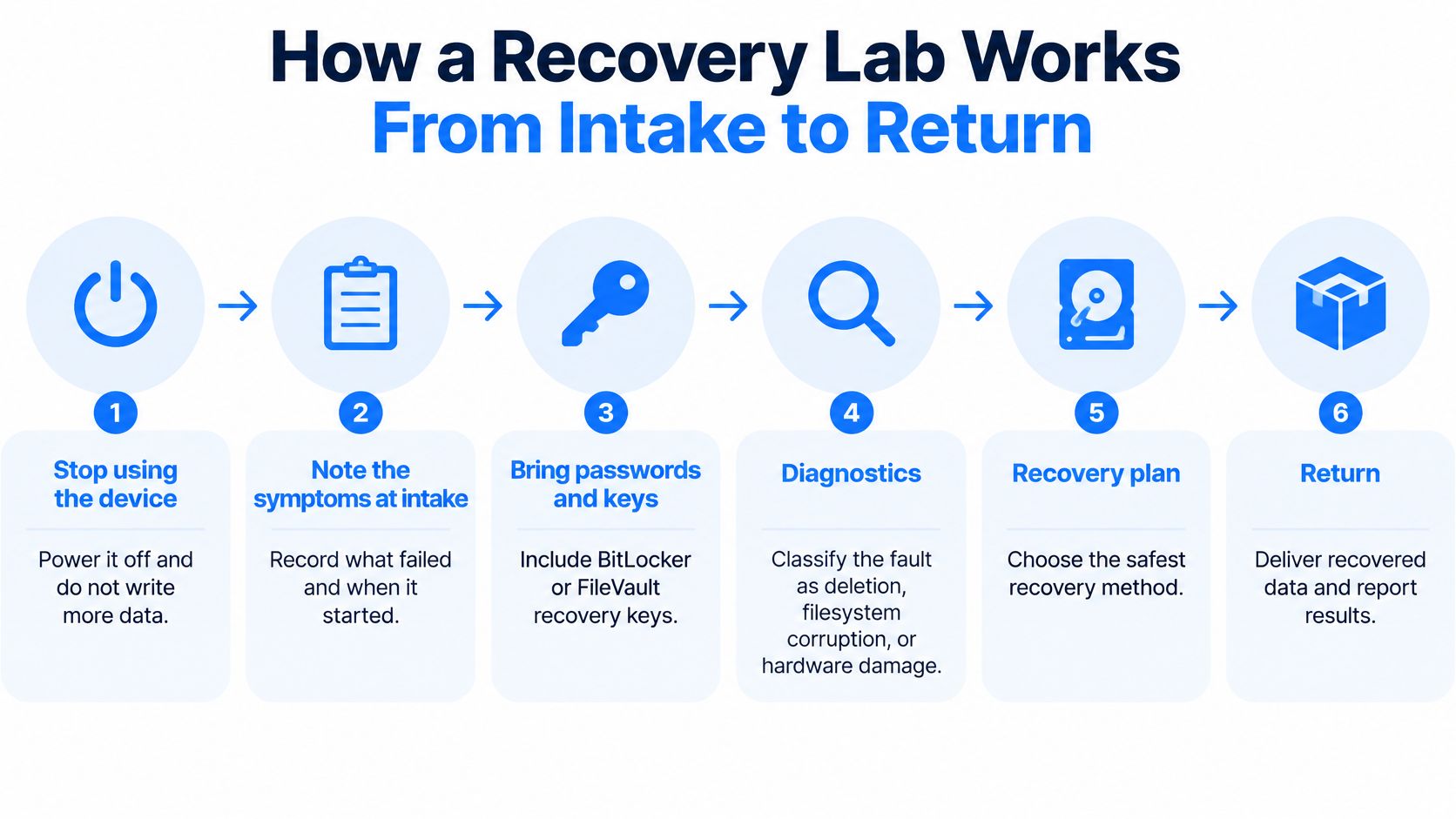
An external drive starts clicking, a laptop shows a format prompt, or an important folder vanishes. The safest first step is to stop using the affected storage. Note what happened, including unusual sounds, error messages, spills, drops and earlier recovery attempts. Avoid installing recovery software on the drive, accepting a format prompt or repeatedly restarting the device.
For encrypted storage, recovery may depend on having the right password or BitLocker or FileVault recovery key. Ask how to share those securely. If a computer is still running during a suspected security incident, get advice before changing its state. An accessible encrypted system can need different handling from a powered-off external drive.
Preserve first, then investigate
Preservation means protecting what remains before trying to interpret it. For a damaged drive, that usually means limiting work on the original and, where possible, analysing a separate copy. It is like keeping the original document untouched while working from a photocopy: experiments on the copy are less likely to change the source.
Diagnostics help identify whether the problem involves deletion, filesystem corruption, electronics, mechanical damage, firmware or encryption. These issues can overlap. For example, a drive that stops responding while a computer is saving a file may have both hardware trouble and filesystem damage.
Steel City IT specialises in recovering data from damaged or corrupted hard drives. Its repairs also undergo a multi-point diagnostic check before and after service.
The lab sequence and why it matters
A recovery service generally follows these steps, adding hardware work only when the fault requires it:
Record the device and authorisation. Note its model, serial number and condition, then confirm the agreed work and quote. This links the device, instructions and results.
Restore an electronic access path. Where appropriate, address failed power or data connections so the storage can be read. This may allow access without making the device suitable for everyday use.
Assess mechanical faults. A clicking or non-spinning hard drive needs specialist assessment rather than repeated attempts on a desktop PC. Internal work requires controlled handling.
Read through a controlled interface. Imaging equipment can manage timeouts, log errors and move past difficult regions, rather than repeatedly stalling at the same point.
Create a sector-level image. Copy readable regions to healthy storage, including filesystem information an ordinary file copy might miss. Record areas that could not be read.
Revisit selected gaps. Targeted retries may retrieve more data without rereading regions already copied. The potential gain has to be weighed against the risk of further deterioration.
Reconstruct the layout on the image. Work from the copy to analyse partitions, folders and allocation records. Repairing the filesystem on the only original can change information that recovery still depends on.
Extract files to another destination. Use surviving directory information where available, or file carving to recognise content patterns when directory entries are missing.
Check usability. Open representative documents, inspect images and test relevant file types. File size alone does not prove that a file is usable; a known hash can help compare it with a trustworthy reference.
Return labelled results. Separate complete, partial and unrecoverable items, and provide recovered files on healthy replacement media.
An image of an encrypted volume may still contain only encrypted information. File reconstruction can have to wait until an appropriate key or authorised access method is available.
What you should receive
What happens at each stage of a recovery
Stage | What the service does | What you should expect |
|---|---|---|
Stop and intake | Record symptoms, passwords and recovery keys, and advise on powering down appropriately | No further boots, software installs or repair prompts |
Diagnostics | Assess deletion, corruption, electronic, mechanical, firmware or encryption faults | A clear quote before recovery work |
Imaging | Make a sector-level copy where the drive can be read, logging unreadable areas | The original storage is not intentionally written to |
Reconstruction | Rebuild partitions and directories, or carve fragments, on the image | Extraction follows creation of a working copy |
Check and return | Open sample files and separate complete, partial and lost items | Files returned on healthy media, with limitations explained |
When comparing providers, the best data recovery service resource is one service page to review against practical questions about preservation, authorisation and whether the returned files are usable.
Logical Recovery and Physical Recovery
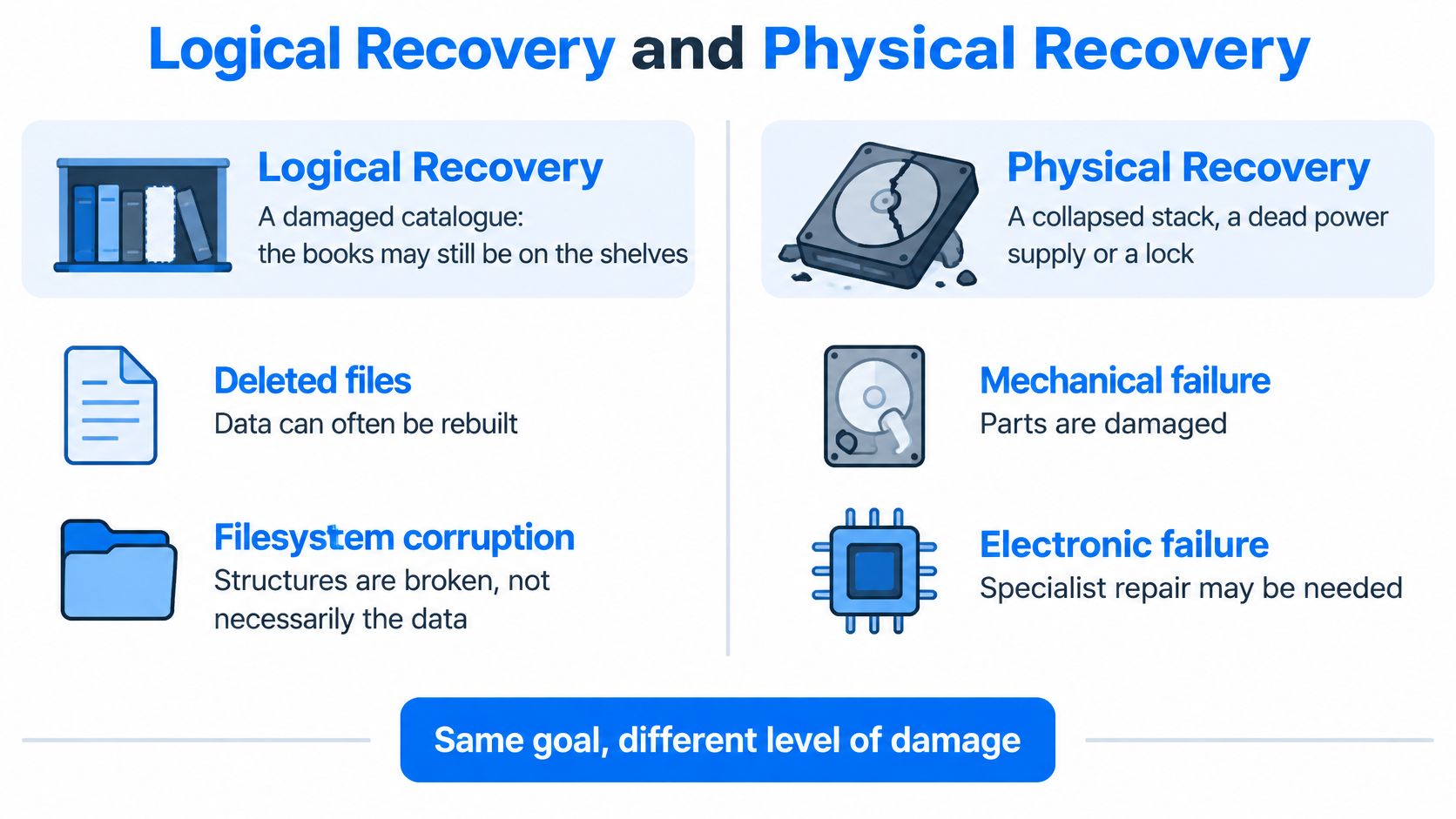
Think of a drive as a library. Logical damage is a damaged catalogue: the books may still be on the shelves, but the system can't reliably locate them. Physical damage affects the shelves, books or mechanisms needed to reach them.
The comparison below separates these broad routes.
Match the method to the fault
Logical recovery covers deleted files, lost partitions, quick formats and damaged NTFS, exFAT or APFS structures. Tools interpret the remaining records or identify recognisable file contents. Our guide to corrupted file recovery explains the distinction between locating a file and repairing damage within it.
Electronic work addresses the path between the computer and storage. A failed USB bridge, damaged connector or liquid-affected laptop board may prevent access even though the storage itself remains readable. Board repair or precision micro-soldering can sometimes restore that path.
Logical, electronic, mechanical, flash and encrypted cases
Route | Typical causes | What the lab does | Drive opened? |
|---|---|---|---|
Logical | Deletion, format, lost partition, corrupt filesystem | Image, then rebuild metadata or carve files | No |
Electronic | Dead circuit board, power fault, liquid-damaged board | Repair or adapt electronics, then image | Rarely the sealed hard-drive enclosure; external electronics may need access |
Mechanical | Clicking, not spinning, head crash | Stabilise, potentially replace heads, then perform controlled imaging | Yes when internal work is necessary, under controlled conditions |
Firmware or flash | Incorrect identification, failed SSD controller, damaged translation layer | Use specialist tools; consider chip-off only when appropriate | Often for chip-off, but not for every firmware fault |
Encrypted volume | BitLocker, FileVault or a password container | Preserve raw sectors, then unlock using authorised credentials | No for encryption alone |
Why chip-off isn't a universal answer
An SSD controller translates the computer's requests into locations across flash memory. Reading the chips directly doesn't automatically recreate that translation, correct every error or bypass encryption. Chip-off is a specialist option, not the default next step whenever an SSD disappears.
Likewise, replacing a hard drive's circuit board isn't always a straightforward swap. Device-specific information may need preserving or transferring, so a visually identical donor board isn't sufficient proof of compatibility.
For another explanation of recovery methods, the following video provides additional context.
A symptom identifies a direction for diagnosis, not a guaranteed repair. Clicking warrants caution, but the technician still needs to establish what's failing before choosing a method.
What Decides If Your Files Return
After accidental deletion, stop writing to the affected storage. Deletion may remove the file's catalogue entry without immediately removing all its contents. Recovery remains possible only while enough of those contents and their identifying information survive.
The decisive questions are whether the bytes still exist, whether they can be reached and whether they can be interpreted. Drive capacity alone doesn't answer any of them. A large readable disk with damaged directory records can present a more favourable case than a small SSD whose deleted contents have already been cleared.
Where the opportunity closes
When files are still recoverable
Incident | Still possible when | Usually gone when |
|---|---|---|
Accidental delete or format | Relevant contents haven't been overwritten or cleared | New files, an installation or TRIM-related clearing removes the required contents |
Corrupt filesystem | Readable media provides enough information for reconstruction | Essential content is destroyed or remains unreadable |
Clicking hard drive | A specialist can stabilise it sufficiently for controlled reading | Severe platter damage destroys the required regions |
SSD after delete or reset | Required blocks remain available and interpretable | Garbage collection has cleared the relevant flash |
Ransomware | A clean backup or usable decryption route exists | Only strongly encrypted copies remain without a usable key or other recovery route |
Encrypted disk | Valid credentials, a recovery key or another authorised unlocking route exists | No usable unlocking route remains |
Sanitised or overwritten drive | Incomplete erasure has left relevant regions intact | Verified effective erasure or overwriting has removed the required content |
These are conditions, not promises. A drive failing partway through imaging doesn't automatically invalidate everything already captured, and the absence of new user-created files doesn't prove that a running system made no writes.
The NCSC's storage-media sanitisation guidance explains that remapped regions and bad sectors can complicate access and erasure, and that sanitisation requires verification. Some information may sit outside the area ordinary software can address. That doesn't mean a laboratory can always retrieve it.
Judge the files you need, not the headline
A recovered filename isn't the same as a recovered document. A spreadsheet may appear in the correct folder yet fail to open, while a video may play normally until it reaches a missing section.
A useful result is an inventory of usable files, not an impressive file count.
Give the technician a priority list, such as the accounts database, current project folder or original photographs. Ask for checks suited to those formats, including application-level testing where appropriate and authorised.
Our explanation of hard-drive failure signs can help you describe symptoms accurately. Don't repeatedly reproduce a worrying noise just to make a better recording for the workshop.
Timelines and Typical Costs in the UK
A recovery estimate depends on the fault and the work needed to make files usable. A drive that appears empty may need logical reconstruction; one with the same symptom may have a failing controller. Different problems call for different tools, labour and levels of risk.
What changes the cost and timing
Case | What can affect the cost and timing |
|---|---|
Logical deletion or corruption | File volume, reconstruction complexity and encryption |
Electronic board fault | Compatible donor parts and board-level repair work |
Mechanical hard drive | Controlled internal work, donor components and head or platter damage |
SSD or flash controller failure | Controller access, chip-level work, capacity and reconstruction complexity |
Diagnostic assessment | Assessment scope, any stated charge and whether recovery goes ahead |
Straightforward logical damage may avoid the parts sourcing and internal handling involved in mechanical work. It can still take time if metadata is damaged, files are fragmented or there is a large amount of data to examine.
Mechanical work may take longer if compatible donor components are needed. With flash storage, the technician must establish whether the controller, translation information and encryption allow meaningful reconstruction. If an area cannot be read, further attempts may carry risks that need to be weighed against the files' importance.
Agree the scope before approving work
After a diagnostic assessment, Steel City IT provides a clear, fair price quote before starting work. It also gives an estimated repair timeline when you drop off the device and tells you if the repair would cost more than the device is worth.
The value of the files and the value of the hardware are separate questions. A low-cost drive may hold records that matter greatly to you. Decide which files you need and what a usable recovery would mean before approving the work.
For more detail on data recovery service costs, consider the estimate alongside the agreed scope. Clarify these points before authorising recovery:
Charges and authorisation: What is payable for assessment, attempted recovery and any additional work?
Priority files: Which folders or file types will determine whether the result meets your needs?
Return arrangements: Is replacement storage included, and how will sensitive files be transferred?
Changes to the estimate: Which findings would require your approval before work continues?
A turnaround estimate describes the expected job. It cannot guarantee that damaged hardware will remain readable throughout recovery.
When a Backup Still Needs the Lab
A household photo drive is accidentally emptied, then disconnected. A separate backup has the holiday pictures, but not the latest family event. Restoring the backup can bring back most of the collection, while recovery from the affected drive may be needed for the missing photographs.
A backup helps only if it contains the right files and can be restored safely. A synchronised folder, an older archive and a complete system backup serve different purposes.
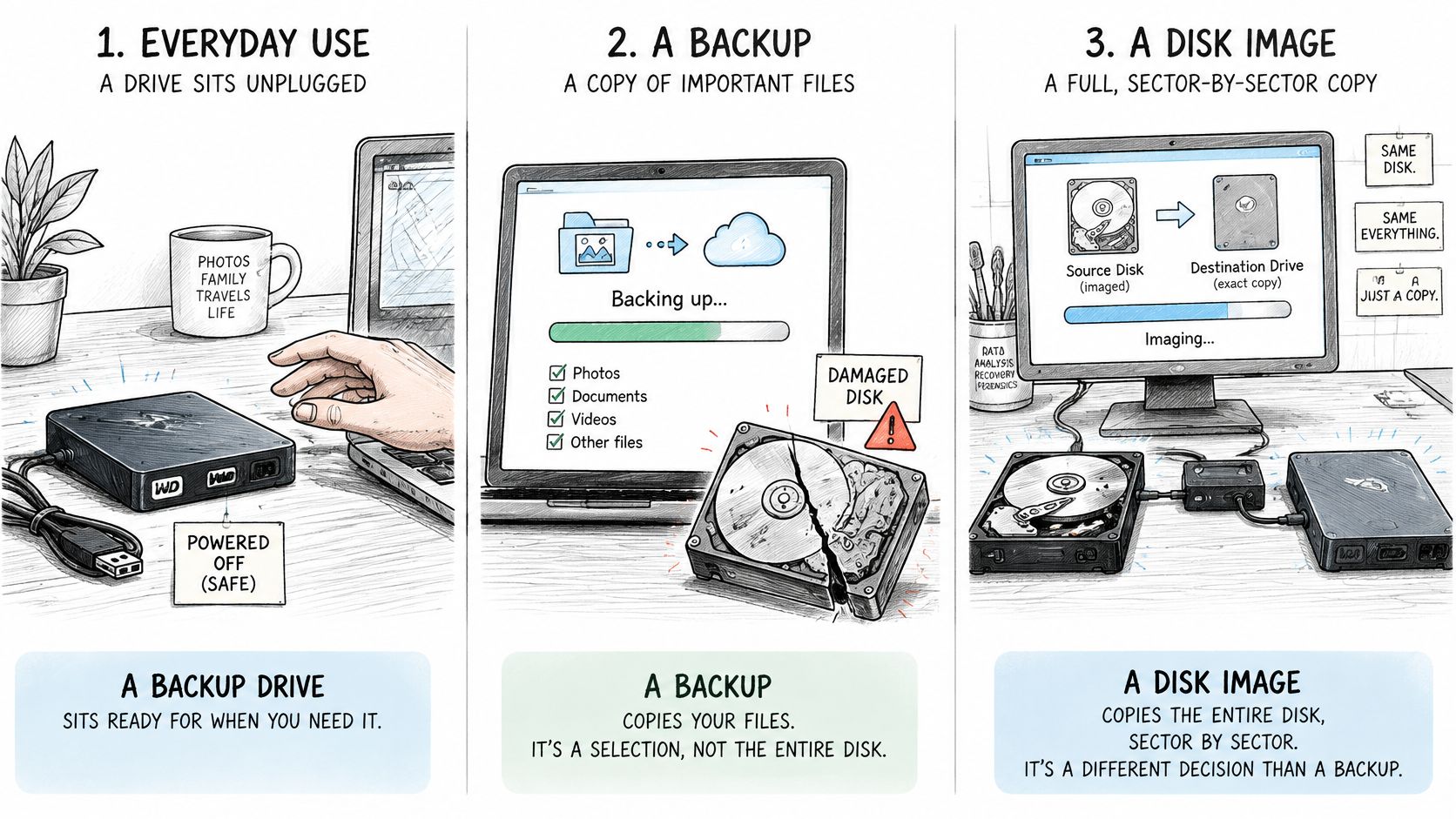
Keep the restored files off the affected drive. Writing to it could overwrite space that still holds the missing photographs. Recovery is an attempt to retrieve those files, not a guarantee they will be usable.
A business laptop with an older cloud copy
A laptop starts clicking, and the business finds that its cloud copy predates recent accounts work. First establish what files are safely available elsewhere. Then decide whether attempting extraction from the laptop is worthwhile.
Comparing the backup with recovered files can help identify newer working versions. The practical test is whether the spreadsheets open and can be reconciled, not whether a folder has been recovered.
A recovery-point objective describes how much recent work a business can tolerate losing. A backup job reporting success does not, by itself, show that the latest files are present or usable.
Ransomware with backups present
Backups are often the first route to restoring data after ransomware, provided they are recent, complete and free of compromise. A copy may be outdated, incomplete, encrypted or deleted, so its existence alone does not make it safe to restore.
Handle the incident in a deliberate order:
Contain the incident: Isolate affected systems and involve the person responsible for incident response.
Assess the backup: Check its coverage, age, accessibility and signs of compromise.
Restore into a clean environment: Check important applications and files before reconnecting normal services.
Preserve missing data and evidence: Arrange imaging of affected storage where needed for recovery or investigation.
Restoring a clean backup and reconstructing files from a damaged disk are separate tasks. Ransomware can require both, alongside security remediation. In a business incident, preserve the affected drive if it may contain missing data or evidence; a backup that appears available is not a reason to erase it.
Hand the Drive Over Without Making It Worse
A recovery service may create working images, extracted folders and transfer copies. Successful extraction creates a confidentiality responsibility, not just a technical result. You need to know what will exist afterwards, who can access it and when temporary copies will be removed.
The Data Health Check document highlights the importance of documented handling, effective destruction and an auditable trail for confidential media. For a Sheffield business holding employee, customer or financial records, that means agreeing the handling arrangements in writing rather than assuming all copies disappear at collection.
Put access and retention in the agreement
Before handing over storage, establish:
Original-media handling: Will it be preserved, and what circumstances require work directly on it?
Authorised access: Which staff may inspect files, and can validation focus on agreed samples?
Working-copy protection: Are images and extracted files encrypted, and where are they stored?
Retention and deletion: How long will temporary copies remain, and what deletion record is available?
Return and disposal: How will results reach you, and what happens to the failed device?
At our Frecheville workshop, we follow strict protocols to keep customer data safe and confidential during repairs. We keep you updated by phone or email after drop-off, so you can make decisions as the assessment progresses.
If you request it, we can perform a complete data wipe during a repair to protect your information. Agree the timing carefully: wiping must not remove the only remaining source before you've accepted and checked the recovered files. Confirm the appropriate wipe or disposal arrangement for the particular media.
Make the handover useful
Bring a short description of the fault, details of earlier attempts and a list of the files that matter most. For business equipment, identify who can authorise access and whether the device may be relevant to a security investigation.
Once files are returned, test them in the applications you use before approving deletion of temporary recovery copies. If the computer itself is beyond repair, we'll tell you directly and can often recommend an affordable replacement or upgrade.
Steel City IT offers data recovery from damaged or corrupted hard drives, with diagnostic assessment and a clear quote before agreed recovery work begins. Visit Steel City IT to arrange a convenient Sheffield drop-off, describe the symptoms and explain which files you need back most urgently.