
PC Hardware Repair Guide for PC Owners

Your laptop was fine last night. This morning it lights up, the fan spins, then it dies before Windows loads, or it sits on the charger without charging at all. You don't know if it's the battery, the drive, or something on the board, and you need the files on it for work. That uncertainty is where good PC hardware repair starts. Not with a new part, and not with a guess, but with evidence about what's failed, what hasn't, and whether fixing it makes sense.
Table of Contents
What PC Hardware Repair Can Solve - Age Is Not a Diagnosis - Data Changes the Order of Work
Recognise Common PC Hardware Faults - Symptoms and What They Can Mean - Combinations Narrow the Field
Follow a Reliable PC Diagnostic Process - The Bench Sequence - When to Escalate
Choose the Right Repair Method - Straightforward Component Replacement - Board Level and GPU Work - Data First and Software Adjacent Fixes
Compare DIY and Professional PC Repair - Where DIY Works Well - Where the Workshop Earns Its Fee
Understand PC Repair Costs and Turnaround - What Actually Drives the Price - Turnaround and the Quotation Checklist
See How Steel City IT Handles PC Repairs - Representative Workshop Scenarios
Make a Confident Repair Decision - When Repair Wins and When It Doesn't - Questions to Ask Before You Authorise Work
What PC Hardware Repair Can Solve
A machine that powers on but behaves unpredictably is a classic bench problem. It might restart under load, freeze at the desktop, or lose its display. Those symptoms feel like one fault, but they can come from overheating, unstable memory, a degrading drive, a failing power rail, or software that's corrupting the boot process. The first job is separation, splitting a physical hardware fault from firmware, configuration, and data problems that imitate one.
True hardware faults are physical. A cracked solder joint, a shorted capacitor, a worn fan bearing, a damaged charging port, and a drive with failing cells all need hands, tools, and testing. A bad driver, a corrupted Windows update, or malware causing instability can look identical from the chair, but opening the chassis won't fix it. Skilled repair works out which side of that line you're on before money gets spent.
Age Is Not a Diagnosis
Owners often assume an older machine isn't worth touching. The UK evidence doesn't support that reflex. WRWA reports that approximately 1 million computers enter UK landfill sites each year, with IT equipment representing 39% of roughly 1 million tonnes of waste electrical and electronic equipment discarded by households and commercial organisations. Many of those machines had recoverable faults, such as failed storage drives, damaged power circuits, or overheating that a technician could have addressed.
A computer sent for disposal hasn't been diagnosed. It's only been given up on.
Repair data reinforces this. Research summarised in 2026 found that about 50% of devices brought to UK repair facilities were fixed, a further 28% were judged potentially repairable, and the laptops examined averaged approximately 7.6 years old. Age alone doesn't determine whether a computer remains serviceable. An SSD replacement, memory upgrade, or cooling service can return an older laptop to practical use.
Data Changes the Order of Work
If the drive holds the only copy of family photos or business accounts, data preservation comes before speed. A technician may image a failing drive before attempting any fix that stresses it, because repeated boot attempts can push a marginal drive over the edge. That ordering, protect data, confirm the fault, then repair, runs through everything that follows.
Recognise Common PC Hardware Faults
Think of a symptom the way you'd treat a dashboard warning light. The light tells you something is wrong, but it doesn't name the failed component, and replacing parts based on the light alone gets expensive fast. A symptom is a starting point for questions, not a verdict.
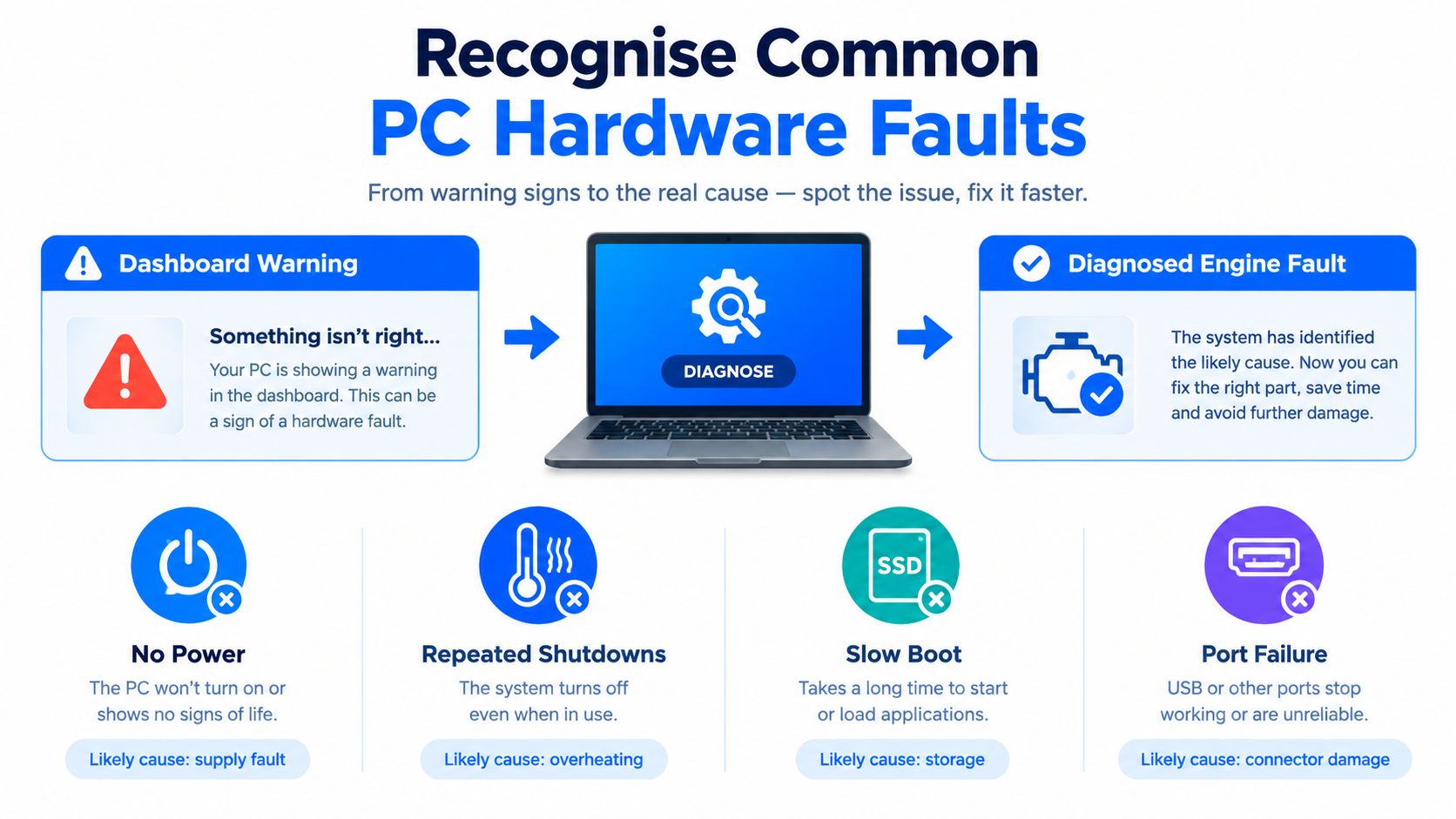
Symptoms and What They Can Mean
No power at all: The fault could sit in the charger, the DC jack, the battery, the power button circuit, or a shorted component dragging a power rail down. A dead machine doesn't mean a dead motherboard.
Repeated shutdowns: Overheating from a blocked heatsink or dried thermal paste is common, but a weakening power supply or failing voltage regulation produces the same behaviour.
Graphical artefacts: Coloured lines, flickering blocks, or driver crashes point toward the GPU or its memory, yet a damaged display cable or failing screen can mimic them.
Slow boot and freezing: Ageing storage is the usual suspect, although insufficient RAM, background software conflicts, and malware produce near identical sluggishness.
Failed ports: A USB or HDMI socket that only works at an angle usually means physical connector damage or cracked solder, not a software setting.
Charging problems: The battery may be worn, but the charging circuit on the board and the port itself fail just as often.
Sound matters too. Clicking from a mechanical hard drive, grinding from a fan, or beep patterns at startup all carry information, and Beyond Surplus on odd computer sounds is a useful reference for recognising what those noises tend to indicate before you take anything apart.
Combinations Narrow the Field
Single symptoms mislead, combinations inform. Artefacts that appear only under gaming load, alongside rising temperatures, tell a different story from artefacts present on an external monitor from a cold boot. UK repair evidence underlines why this distinction matters. A 2024 London assessment estimated that households repaired about 5,915 tonnes of equipment, only about 5% of household electrical and electronic equipment reaching first end of life, so recoverable machines are routinely written off on symptoms alone.
Liquid damage deserves special honesty. A laptop that works after a spill isn't necessarily fine, because corrosion develops under chips where you can't see it. Never condemn a motherboard, drive, power supply, or graphics card on a symptom list. Each of those assemblies is expensive, and each deserves a test before a verdict.
Follow a Reliable PC Diagnostic Process
Diagnosis at the bench works like triage. Each step narrows a list of suspects, and no single test carries the whole case. The sequence below protects your data first and replaces nothing until the evidence points somewhere specific.
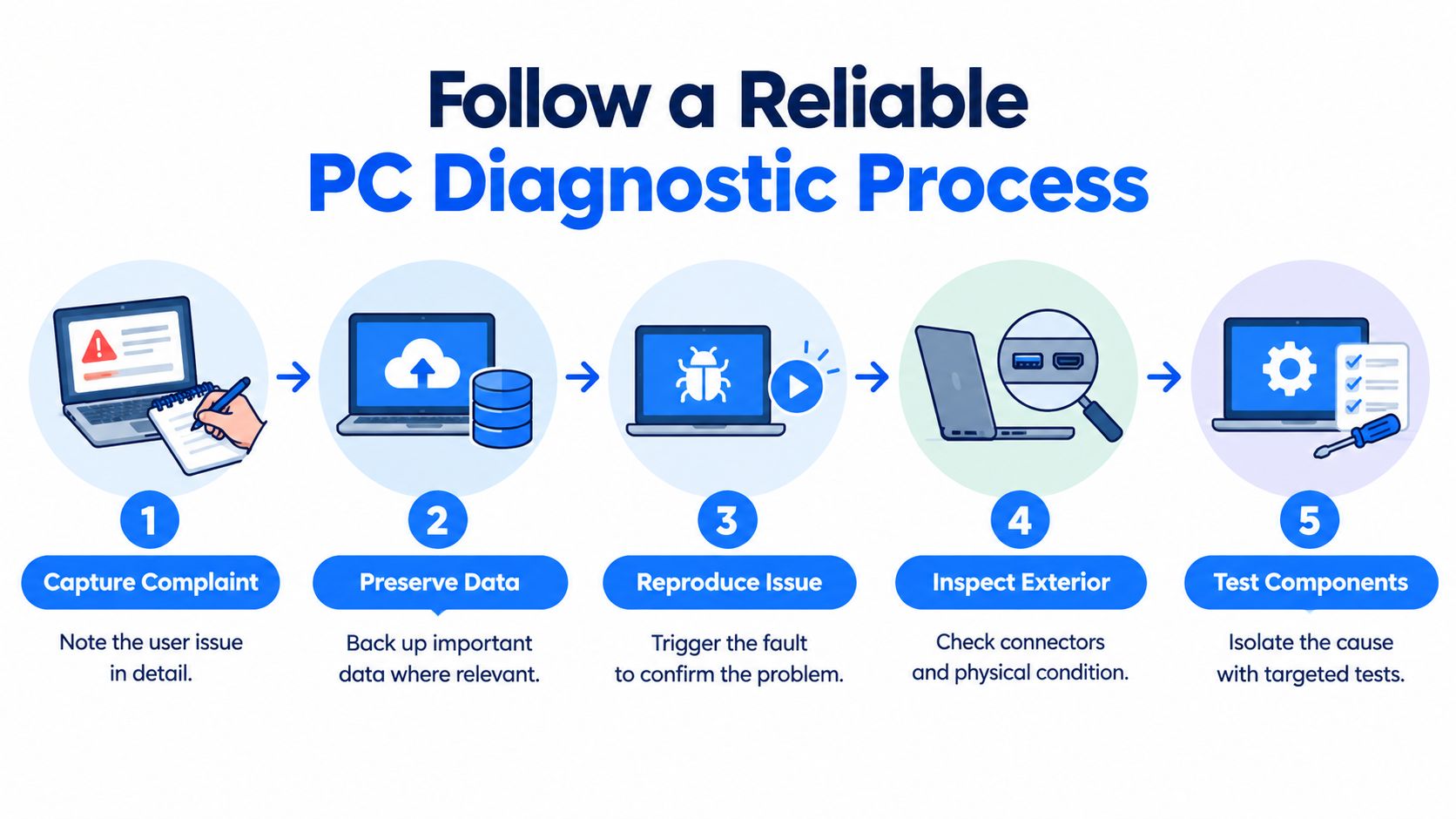
The Bench Sequence
Capture the complaint in the owner's words. When does it fail, what changed recently, and does it fail on battery, on mains, or both? Vague intake notes produce vague repairs.
Preserve data where it's at risk. If the drive clicks, reports errors, or holds irreplaceable files, imaging or backup happens before stress testing anything.
Reproduce the fault. A problem that can't be triggered on the bench can't be confirmed as fixed later, so the technician recreates the conditions the owner described.
Inspect before powering further. Connectors, ports, board surfaces, and cooling paths get examined under magnification for corrosion, thermal damage, cracked joints, and swollen components.
Test power delivery. Voltages and current draw get recorded, because a board drawing abnormal current is telling you where to look before it tells you anything else.
Isolate memory and storage. RAM runs through dedicated diagnostics, one module at a time where possible, and the drive gets tested separately with SMART or NVMe health checks.
Measure temperatures under load. CPU and GPU readings during a controlled stress test separate a cooling failure from a component failure.
Substitute known good parts. A trusted power supply, display path, or memory module swapped in temporarily confirms or clears a suspect without buying anything.
Document the confirmed fault. The finding, the test that proved it, and any contributing conditions go in writing before repair options get priced.
This methodical approach is what separates professional diagnostics for computer faults from parts swapping, and it's slower than guessing only until guessing fails twice.
When to Escalate
Certain presentations skip the gentle route. Liquid damage needs the board out and inspected, not repeated power attempts. A no power laptop with a shorted rail needs board level measurement, not another charger. Corrupted storage with valuable data needs recovery procedure, not a Windows reinstall. Recurring crashes and GPU instability that survive driver changes need component level investigation, because a failed MOSFET, shorted capacitor, or degraded VRAM produces symptoms software can't fix.
Practical rule: If a test result would change what you do next, run the test. If it wouldn't, you're decorating a guess.
Verification closes the loop. After any repair, the machine gets stress tested, its storage health rechecked, its temperatures confirmed under load, and the original fault condition recreated to prove it's gone. You should receive a written fault report covering the confirmed failure, what was repaired, what was tested, and any remaining risk the technician noticed.
Choose the Right Repair Method
Once a fault is confirmed, the repair choice is usually clearer than owners expect. The options fall into four broad routes, and picking the least disruptive one that solves the problem is the whole craft.
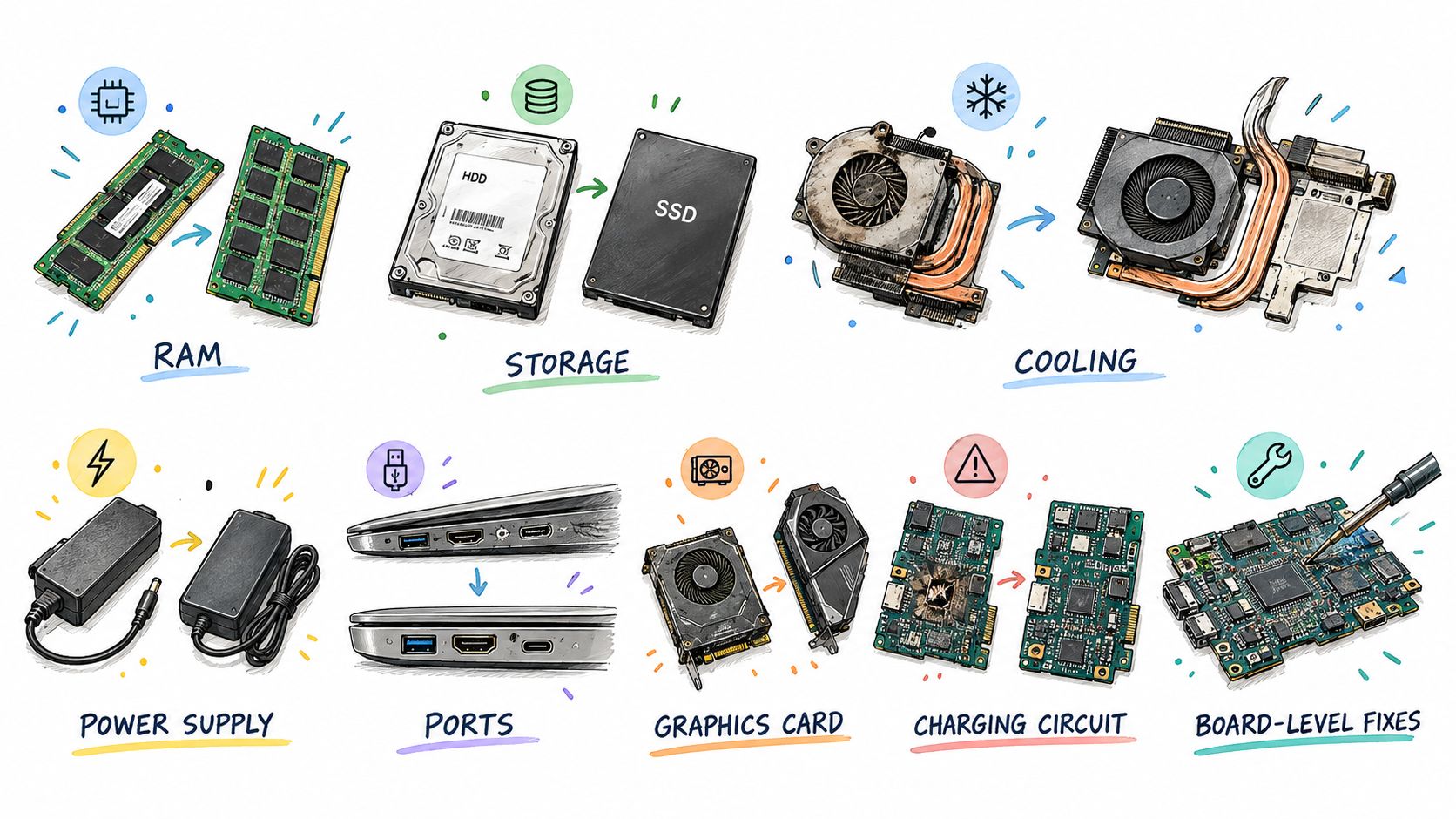
Straightforward Component Replacement
Some faults end with a single part. Failed RAM gets replaced and retested. A degraded hard drive becomes an SSD upgrade with data migration, which restores boot reliability while the working CPU, chassis, display, and power circuitry stay in service. A dying desktop power supply is a contained swap, and understanding what that job involves through a guide to power supply replacement helps you judge a quote sensibly. Cooling work, such as cleaning blocked fins, replacing a failed fan, and renewing thermal paste, fixes shutdowns that looked far more serious.
These jobs share a trait. The faulty assembly is accessible, the replacement is a standard part, and success is easy to verify. PC hardware repair is fastest and cheapest, and for small firms planning equipment life, a practical guide for small businesses on hardware lifecycle management helps frame when such replacements beat buying new.
Board Level and GPU Work
Other faults live on the board itself. A laptop that won't charge may need a charging circuit component replaced under a microscope rather than a whole new logic board. Liquid damage may need corroded components removed, pads cleaned, and connections rebuilt with micro soldering. A graphics card producing artefacts may need VRAM fault correction or power stage repair, preserving an expensive card that would otherwise be scrapped.
This work demands schematics knowledge, hot air and soldering stations, and magnification. It also carries honest limits. Extensive corrosion across multiple board areas, or a failed main processor, can make repair technically possible but uneconomic, and a good technician says so before billing you for the attempt.
Data First and Software Adjacent Fixes
Sometimes the correct first intervention isn't a repair at all. A failing drive enters sector level data recovery before anyone discusses replacement, because the files may matter more than the machine. Only after the data is safe does the hardware decision begin.
Performance complaints also split here. Software bloat, background conflicts, and malware can make healthy hardware feel broken, and a system cleanup or clean Windows reinstall with drivers and updates configured may restore stability without opening the chassis. That's not hardware repair, and it shouldn't be sold as such, but honest diagnosis routes you there when the evidence points that way.
Compare DIY and Professional PC Repair
Plenty of owners can handle more than they think, and plenty of repairs punish optimism. The honest dividing line isn't confidence, it's what happens when the job goes sideways.
Factor | Suitable DIY context | Professional service context |
|---|---|---|
Access and assembly | Desktop with standard screws and socketed parts | Slim laptop with glued battery, ribbon cables, hidden clips |
Diagnosis | Obvious single fault, such as a visibly dead fan | Intermittent crashes, no power, multiple possible causes |
Data risk | Drive healthy and fully backed up | Failing drive, no backup, business or family data at stake |
Tools required | Screwdrivers, spare known good parts | Multimeter, microscope, soldering station, bench power supply |
Parts and warranty | Standard part, out of warranty machine | Genuine part sourcing matters, warranty still active |
Fault depth | RAM, storage, cooling swaps | Charging circuits, liquid damage, GPU and VRAM faults |
Where DIY Works Well
Desktop owners with backups have real room to act. Reseating RAM, swapping a storage drive, cleaning dust from heatsinks, and testing with a spare cable or monitor are sensible home steps. Document what you change, one variable at a time, so you learn something from each result. If the machine improves, you've confirmed the fault yourself.
Where the Workshop Earns Its Fee
Board level work changes the risk profile completely. Micro soldering without magnification and practice lifts pads and creates new faults. Liquid damage assessment needs the board removed and inspected, not rice and hope. Storage migration from a drive that's already erroring can destroy the data mid copy if it's handled like a healthy drive, and personal data exposure during any repair deserves controlled handling you can ask about.
Repairability also isn't guaranteed by law for most computers. UK rules currently give stronger repair and information requirements to selected appliances and certain server products than to laptops, and laptops aren't covered by a UK law equivalent to the EU's broader right to repair framework. Parts pairing, firmware compatibility, and component authentication can block a repair that looks simple on video, which is exactly where workshop experience and parts channels matter.
Escalate when data is important and unbacked up, when symptoms recur after a simple replacement, when damage spans multiple areas, or when your next step could make the original diagnosis harder to confirm. Stopping early is a skill. A machine untouched beyond basic checks arrives at the bench with its evidence intact.
Understand PC Repair Costs and Turnaround
No honest technician can price a repair from a symptom description alone, and any fixed quote given without seeing the machine is a guess dressed as certainty. What you can understand in advance is the set of variables that will shape your quote.
What Actually Drives the Price
Parts availability and quality: A standard RAM or SSD module is easy to source. A model specific charging component or display assembly may not be, and genuine parts cost more than counterfeit alternatives that fail early.
Access labour: Reaching a desktop power supply takes minutes. Reaching a soldered component inside a sealed ultrabook takes careful disassembly and reassembly time.
Damage extent: Localised corrosion is one job. Corrosion that has travelled across a board, or thermal damage affecting several components, is another entirely.
Firmware and compatibility: A replacement board or drive may need firmware validation or authentication before the machine accepts it, adding bench time.
Data value: If recovery comes first, that controlled work is part of the cost, and it changes the repair versus replacement calculation.
Expected reliability afterwards: A cheap repair with poor odds of lasting isn't cheaper than a sound one, and the quote should reflect realistic outcomes.
Reviewing information on computer repair prices and what's included before you visit helps you read any workshop's quotation with better questions ready.
Turnaround and the Quotation Checklist
Steel City IT states that typical turnaround is within a few days, dependent on the complexity of the problem. A component swap with parts on the shelf sits at the fast end. Board level diagnosis, parts on order, or data recovery stretches the timeline, and a workshop that explains which category you're in is being straight with you.
Before authorising work, confirm the quote separates diagnosis, parts, labour, data handling, and post repair testing. Ask what happens if the diagnosis changes once the machine is open, whether you'll be contacted before costs rise, and what the position is if you decline the repair after diagnosis. Ask which parts will be fitted and whether they're genuine. A transparent workshop answers these without friction, because those answers are its normal process rather than a negotiation.
See How Steel City IT Handles PC Repairs
Steel City IT is a Sheffield repair workshop based in Frecheville, serving the city and nearby areas including Birley, Hackenthorpe, and Woodhouse. The workshop focuses on computers, laptops, and consoles, and doesn't offer mobile phone or tablet screen repairs.

Representative Workshop Scenarios
A slow desktop arriving at the bench gets assessed across three fronts before any parts are suggested, covering software bloat, ageing storage, and background conflicts. If the drive is healthy and the clutter is the problem, the answer is cleanup and optimisation. If the storage is failing, the conversation becomes an SSD upgrade with data migration.
A liquid damaged laptop follows a different path. The logic board comes out for inspection under magnification, corrosion gets mapped, and the repair decision depends on how far the damage has spread. Where the damage is localised, board level diagnostics and micro soldering can restore power or charging function without a full board replacement.
A failing drive with unbacked up business files enters data recovery first, using sector level analysis and controlled handling, before anyone discusses the machine itself. A faulty NVIDIA RTX or AMD graphics card with artefacts or instability receives component level diagnosis, which may lead to VRAM work or power component replacement rather than scrapping the card. Businesses weighing ongoing support arrangements alongside one off repairs sometimes review managed IT support options to understand how planned support differs from reactive workshop repair.
The workshop's video below shows this diagnostic approach being applied in practice.
Across these scenarios, the constants are clear communication about findings, genuine parts rather than counterfeit components, controlled handling of customer data, and post repair testing before handover. The same bench handles custom gaming PC builds, console repairs covering Xbox, PlayStation, and Nintendo Switch faults such as HDMI port damage and overheating, and virus and malware removal where stability problems turn out to be software led.
Make a Confident Repair Decision
Strip the process down and five moves decide most outcomes. Protect the data, confirm the fault, compare repair with replacement on real numbers, choose the right service level, and require verification before you pay and leave. Skipping any one of them is how owners end up buying parts they didn't need or binning machines that had years left.
When Repair Wins and When It Doesn't
The UK picture supports giving repair a serious hearing. Research on reuse estimates that nearly 40% of laptops taken to UK recycling facilities are suitable for reuse, while only 14% of UK electrical and electronic equipment is diverted for reuse compared with 53% sent for recycling. Apparent obsolescence is a poor guide to real end of life.
Repair usually wins when one assembly has failed inside an otherwise sound machine, such as ageing storage due an SSD, a cooling system needing service, a damaged port, or a board level fault that's localised and repairable. The environmental arithmetic points the same way, since the UK placed approximately 1.86 million tonnes of electrical and electronic equipment on the market in 2024 and generated an estimated 1.65 million tonnes of WEEE. Extending a working machine's life keeps its embodied materials in service.
Replacement wins when damage is widespread, parts are unavailable, corrosion is extensive, or the repair cost approaches the value of a better machine once data migration, software setup, and disposal are counted. Data recovery sits outside this choice entirely, because recovering files from a dying drive can be worthwhile even when the computer itself isn't.
Questions to Ask Before You Authorise Work
What's the confirmed failure, and which test proved it?
Which parts will be fitted, and are they genuine?
What's the expected reliability after this repair?
What testing will the machine pass before handover?
What remaining risks did the inspection find?
How long will it take, and what could extend that?
A failed PC isn't automatically waste. It's a question that deserves an evidence led answer before replacement becomes the default.
Bring the machine, describe the symptoms including anything you've already tried, and let the diagnosis lead. That's how PC hardware repair stays a rational decision rather than an expensive hunch.
If your desktop, laptop, or graphics card is showing any of the faults covered here, Steel City IT in Frecheville offers evidence led diagnostics, component and board level repair, upgrades, and data recovery across Sheffield. Visit Steel City IT to describe your fault and get your machine assessed before you write it off.