
Beyond Economical Repair: When to Fix or Replace

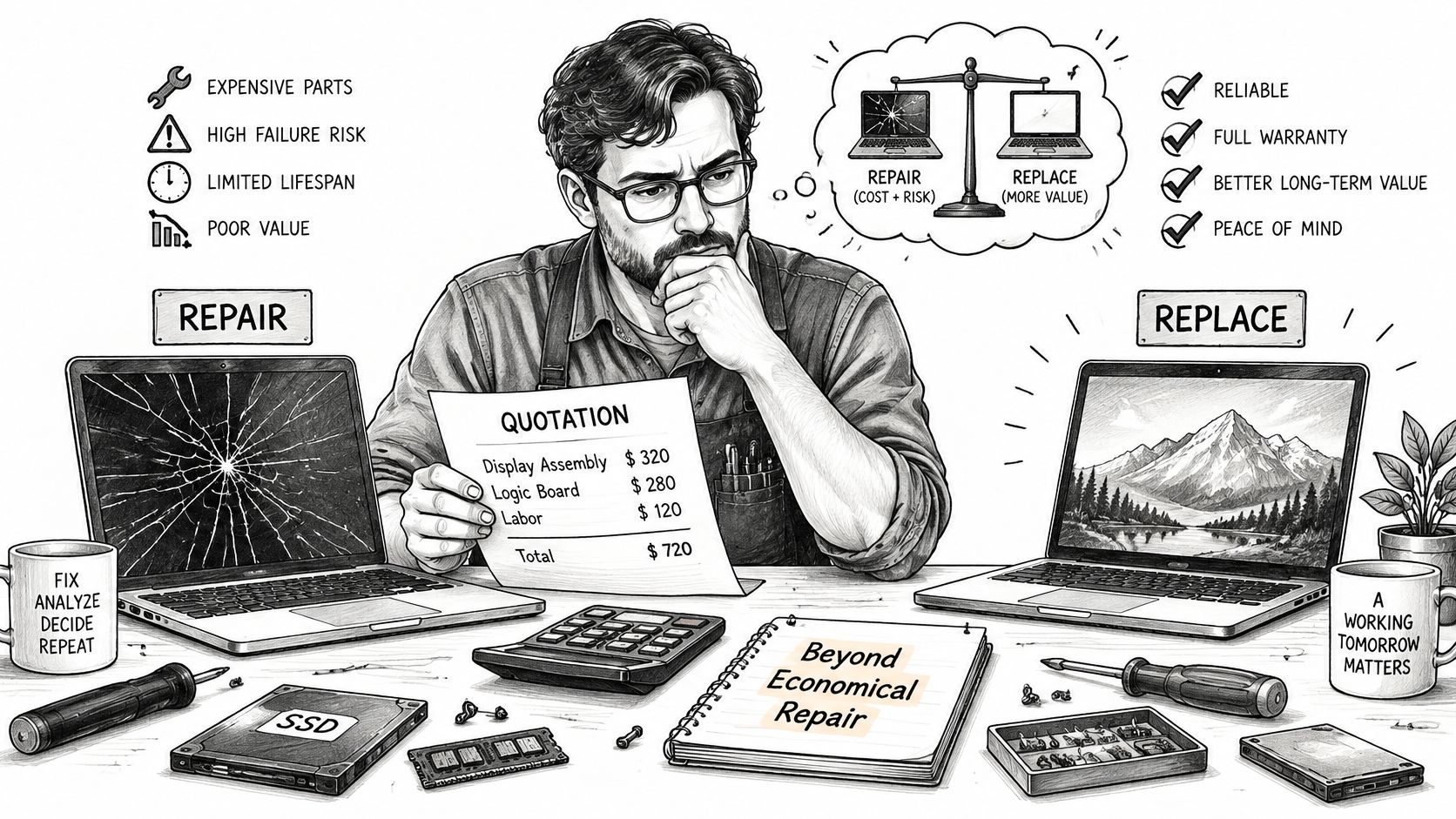
A device is beyond economical repair when the fully loaded cost of fixing it, plus the risk of it failing again, approaches or exceeds the cost of a working equivalent.
Your laptop won't charge, your gaming PC shows strange blocks across the screen, or your console shuts down halfway through a game. You've been told it's not worth fixing, but you still need to know what that judgement includes, especially when your files are inside and a replacement won't be cheap.
An old or faulty device isn't automatically worthless. The useful question is what you'd spend to restore dependable service compared with what you'd spend to replace it.
Table of Contents
What Beyond Economical Repair Really Means - Age doesn't settle the question
The Cost Test Behind Every BER Verdict - Build the total in the technician's working order - Keep unknown costs visible
Worked Repair or Replace Decisions for Four Devices - Deciding factors in four BER cases - Gaming PC with GPU artefacts - MacBook with liquid damage and no charging - Console with HDMI damage and overheating - Budget laptop with several faults
Board-Level Repair Versus Replacing the Whole Device - Start with the smallest effective intervention - Know when a broader replacement makes sense
Confirm the Repair Decision Before You Replace - Make the written estimate the deciding document - Plan the handover before buying
What to Do With a Device Beyond Repair - Follow a data-first handover sequence - Don't confuse disposal with data security
What Beyond Economical Repair Really Means
Beyond economical repair, often shortened to BER, is an economic verdict, not necessarily a technical one. A technician might be able to make a machine work again without being able to recommend the expense.
Think about an engine repair. A garage should compare the proposed work with a comparable used car, including its condition and likely reliability. Whether the engine can physically run again is only part of the decision.
The same distinction applies to electronics. A laptop that looks tired might need an available, replaceable part. A newer machine might have extensive damage that makes dependable restoration much harder.
Age doesn't settle the question
Roughly two-thirds of respondents considered repair first when a small electrical or electronic product broke or malfunctioned, according to ReLondon's ReCare project. Repairability, repair price, original purchase price, and the product's condition and quality all influenced their decisions.
For a Sheffield customer weighing laptop repair against replacement, those factors need translating into a practical comparison:
Current value: What would the machine be worth in working condition, rather than what did it cost originally?
Equivalent replacement: What would another device capable of the same work or games cost?
Remaining useful life: Would the repaired machine still meet your needs, with a reasonable prospect of reliable service?
A single failure doesn't answer these questions. Nor does a scratched case, an old purchase receipt or an expensive original specification.
Practical rule: A BER verdict should explain why the proposed repair represents poor value, not simply describe the machine as old.
The strongest assessment therefore combines a documented estimate, an honest view of remaining life and a replacement comparison. Without those, you've received a conclusion without enough information to judge it.
The Cost Test Behind Every BER Verdict
A useful repair estimate starts with fault isolation, not a guess at the most expensive replacement part. Screen corruption, for example, doesn't by itself prove that an entire graphics card needs replacing.
There's a reason to resist premature disposal. A UK Parliament submission analysing 600 small electrical appliances found that 36% sent for recycling were still working, while a further 10% required only simple, low-cost repairs. That doesn't predict your computer's condition, but it shows why a disposal decision needs evidence.
Build the total in the technician's working order
Diagnosis establishes the fault. Check storage health, memory, cooling, power delivery and the relevant board circuitry. Record the diagnostic charge, or state whether it's included in the repair price.
Labour reflects the actual operation. Swapping accessible RAM is different from tracing a charging fault under a microscope. Include disassembly, reassembly and any necessary consumables, rather than counting only the minutes spent fitting a part.
Parts need identification and availability checks. Match the exact component or board revision before accepting a price. A listing for a similar-looking part isn't confirmation that a compatible, genuine replacement can be obtained.
Data handling gets its own allowance. Establish whether files are backed up, need copying or require recovery from failing storage. Don't assume a hardware quote includes saving documents, photographs or business records.
Testing confirms more than startup. Include appropriate memory tests, storage checks, charging checks or graphics load testing. At Steel City IT, every repair undergoes a multi-point diagnostic check before and after the service.
Repeat-failure risk needs an explanation. Corrosion, damaged board layers or evidence of prolonged overheating can undermine an otherwise successful repair. Any financial allowance should be identified as a decision-making contingency, not presented as a guaranteed future bill.
Replacement provides the benchmark. Compare a working device with suitable performance, condition and warranty. Include the work needed to make it usable, such as transferring files and reinstalling applications.
Keep unknown costs visible
Repair total = diagnosis + labour + parts and consumables + data handling + testing + risk allowance.
Set that total against the equivalent replacement cost. Mark an unconfirmed amount with a question mark on your working sheet until the quote resolves it; don't treat an unknown as free. Each entry should carry a figure or an explicit explanation that it's included elsewhere or not required.
For the charging structure behind a quote, our computer repair pricing guide provides useful context. The comparable vehicle decision is also helpful: Scrap A Vehicle's guide to decide whether to repair or scrap offers another way to think about repair spending against replacement value, without importing vehicle-specific thresholds into electronics.
Worked Repair or Replace Decisions for Four Devices
A high repair bill isn't automatically bad value, and a small bill isn't automatically good value. The outcome changes with the machine's capabilities, condition and what you need to preserve.
In a 2025 survey of 2,000 UK consumers, around 60% said a repair must be available at a reasonable price, according to the Nuremberg Institute for Market Decisions survey. For an individual owner, reasonable needs to mean more than cheaper than the original purchase.
Deciding factors in four BER cases
These are illustrative decision routes, not diagnoses or fixed-price promises.
Case | Repair route | Deciding factor | Likely verdict |
|---|---|---|---|
Gaming PC with GPU artefacts | Component-level GPU repair | Configured system and stored data worth keeping | Repair, if the GPU fault is isolated |
MacBook with liquid damage | Board-level micro-soldering | Machine value and the files on it | Repair, if the fault is confined to power or charging circuits |
Console with HDMI and overheating faults | Port replacement and cooling service | Repair cost against a working replacement console | Repair in most cases with isolated faults, unless failures keep recurring |
Ageing budget laptop with stacked faults | Battery, storage and hinge repairs together | Total cost against a working equivalent | Replace, after securing the data |
Gaming PC with GPU artefacts
Say a gaming PC displays coloured blocks under load but otherwise boots normally. Before condemning the graphics card, a technician should exclude the display cable, monitor, driver problems and unstable system memory, then investigate the GPU and its memory.
If testing isolates a repairable graphics-card fault, compare component-level repair with a suitable replacement card. Replacing the entire PC would be a different, much broader purchase, particularly when the processor, storage and other components still meet your needs.
The configured system also matters. Preserving a working setup can avoid unnecessary reinstallations, although keeping the same card shouldn't outweigh a poor reliability outlook.
MacBook with liquid damage and no charging
Consider a MacBook that stopped charging after a spill. The useful distinction is between a confined charging-circuit fault and corrosion affecting several areas of the logic board.
A targeted repair may justify a substantial quote when the machine remains capable and access to its files matters. That doesn't mean valuable data makes every restoration worthwhile: recovering files and restoring the MacBook for everyday use are separate objectives.
Keep the device powered off after liquid exposure and arrange assessment. Repeated attempts to charge it can make diagnosis and recovery more difficult.
Console with HDMI damage and overheating
A console with a visibly damaged HDMI socket and thermal shutdowns needs both faults assessed. Replacing the socket won't resolve restricted airflow, and cleaning the cooling system won't restore damaged connections.
If the board connections remain repairable and cooling checks reveal a serviceable system, a port repair and cooling service may be sensible. If testing instead reveals wider graphics faults or shutdowns continue after the cooling issue is addressed, the replacement comparison becomes less favourable.
The quote should cover a dependable, playable console, not merely an image appearing briefly on a screen.
Budget laptop with several faults
An ageing budget laptop with a dead battery, slow storage and a cracked hinge presents a different calculation. Battery replacement, storage work, installation and structural repairs all belong in the same estimate.
A quick storage upgrade might improve responsiveness while leaving the lid insecure and the laptop unusable away from a socket. If the complete repair still leaves inadequate performance or an unsuitable operating system, replacement is the more rational route.
Judge the finished machine you'll have after paying, not just the fault you can fix first.
An accessible desktop with spare drive bays, replaceable RAM and a standard power supply offers a different upgrade path from a thin laptop with soldered components. Not every thin laptop is unrepairable, but access, component design and parts availability change the labour and options.
For each machine, record working value, upgrade path, stored data, available parts and expected reliability. The verdict should follow those traits and the written estimate, rather than a birthday or an arbitrary fraction of the original price.
Board-Level Repair Versus Replacing the Whole Device
Repair route | What it involves | Best when | Main limit |
|---|---|---|---|
Component swap | Replacing an SSD, RAM stick, fan or HDMI port | The fault is isolated and the part is available | Little use if underlying board damage remains |
Board-level micro-soldering | Repairing power, charging or liquid-damage faults on the logic board | The device is valuable and damage is localised | Needs specialist tools and skilled labour |
Whole-board or assembly replacement | Fitting a replacement motherboard or assembly | Diagnostics show widespread damage and a suitable board is available | Can cost substantially more than targeted repair |
Replacing the whole device | Buying a new or refurbished machine | Repair costs approach a working equivalent or suitable parts cannot be found | Data, configuration and reusable parts need securing separately |
Start with the smallest effective intervention
A replaceable fan or storage drive can make a straightforward component swap appropriate. An HDMI port also counts as a component replacement, but it's commonly soldered to the board and requires more equipment and skill than fitting RAM.
Some workshops decline soldered repairs because they don't have the tools, training or testing capability. That describes the workshop's scope, not necessarily the device's technical repairability.
Board-level micro-soldering goes further by identifying and repairing faults within a circuit. A technician may use magnification, electrical measurements and controlled soldering equipment to investigate charging or power delivery without replacing the complete board.
At Steel City IT, we specialise in complex repairs, including precision micro-soldering and liquid damage restoration. We use only genuine parts, never fakes or third-party components.
Know when a broader replacement makes sense
A whole-board replacement can be appropriate when damage is widespread and a suitable board is available. However, an assembly quote shouldn't be mistaken for proof that targeted work is impossible.
For an explanation of that distinction, can a logic board be repaired? addresses the repair route. Readers comparing terminology across quotations can also understand motherboard repair options with myhalo, while keeping their own device's diagnosis central to the decision.
Quote check: Ask whether the price covers a repaired original board, a replacement board or an entirely different device.
Targeted work has limits. Burnt multilayer boards, extensive corrosion, repeated thermal damage and unavailable genuine components can make a reliable repair impractical.
Replacing the device becomes reasonable when the available intervention can't deliver safe, dependable operation at a sensible total cost. Get the proposed route and its limitations in writing, including what testing will establish before the machine is returned.
Confirm the Repair Decision Before You Replace
Replacing a repairable laptop or console sends useful materials towards waste streams and creates demand for a complete replacement, even when targeted work could restore function. The UK Government's waste prevention programme for England estimates electrical and electronic waste generation at approximately 23.9 kg per person in 2019.
That's a reason to assess carefully, not an instruction to repair everything. Unsafe power circuitry, severe corrosion, persistent intermittent faults or inadequate performance after repair can justify moving on.
Make the written estimate the deciding document
Get the technical basis: Record the failed subsystem, test evidence, proposed parts source and labour required. Include any uncertainty that can only be resolved after further investigation.
Compare the finished options: Consider replacement performance, warranty, expected reliability and data-recovery status. A replacement without your necessary files or software isn't yet a like-for-like outcome.
Choose the appropriate destination: Authorise repair, approve an upgrade, investigate trade-in or reuse, or arrange responsible recycling. Keep the estimate and decision together.
For business owners, interruption also belongs in the decision. Networking2000's discussion of when business computers need repair provides context for considering disruption alongside the workshop bill.
Plan the handover before buying
If replacement is justified, confirm how the files will move and whether the old storage is healthy enough to copy normally. Our data migration guide explains the transfer route; a failing drive may need recovery assessment instead.
At drop-off, we give an estimated repair timeline. Most repairs can be completed within a few days, depending on the complexity of the issue, so don't assume replacement is automatically the quickest route.
Before authorising disposal or buying another machine, bring the device for assessment and request the estimate in writing. A clear description of the fault and the proposed outcome gives you something concrete to approve or decline.
What to Do With a Device Beyond Repair
Beyond economical repair doesn't mean worthless. Files, usable components and potential reuse can remain after restoring the complete machine stops making financial sense.
Research published in 2025, reported by Electronicspecifier, found that 38% of Britons kept broken or obsolete gadgets in a dedicated drawer. A deliberate handover process is more useful than leaving a device indefinitely because you're unsure what should happen next.
Follow a data-first handover sequence
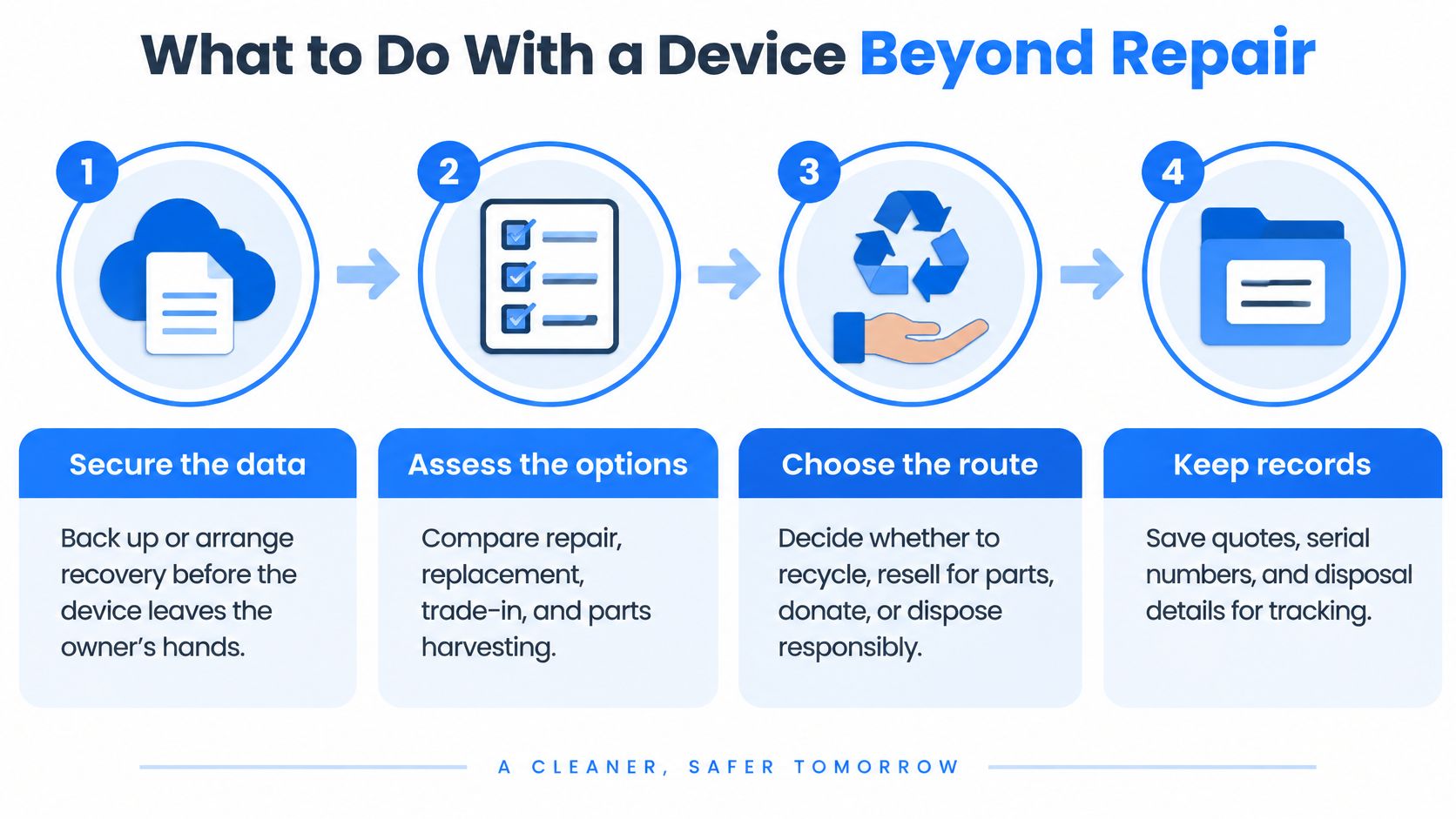
Secure the data before surrendering the device. Back up accessible files or arrange recovery assessment if storage won't read reliably. Confirm that important files open from the backup before approving erasure or disposal.
Identify reusable components. Healthy SSDs, RAM, graphics cards, cases and suitable power supplies may serve another compatible machine. Have their condition checked rather than transferring a suspected faulty part into a working system.
Reconsider a narrower intervention. If the original verdict came from a whole-board quote, establish whether a specialist assessment offers a credible alternative. This is a check on the proposed method, not a reason to fund repeated speculative repair attempts.
Consider trade-in, refurbishment or donation. Describe faults clearly and confirm whether the recipient accepts non-working equipment. Remove personal accounts and arrange appropriate data sanitisation before handing over storage.
Recycle what can't reasonably be reused. Use a reputable electrical-waste service that can explain its handling and data-destruction arrangements. Keep the serial number, disposal receipt and any erasure confirmation with your records.
Don't confuse disposal with data security
Deleting files or leaving a broken machine unable to boot doesn't establish that its storage is unreadable. Where secure erasure can't be verified, arrange suitable professional handling rather than assuming the failure protects your information.
Right-to-repair provisions don't cover every computer and gaming product, so don't assume a rule will guarantee access to the part your machine needs. Clear workshop advice remains important, particularly when choosing between reuse and dismantling.
If a repair costs more than the device is worth, we tell you. If a device is beyond repair, we say so directly and can often recommend affordable replacements or upgrades.
Bring the device to our Frecheville, Sheffield workshop with its charger and a description of the symptoms. Tell us whether preserving the files is your priority before any repair or disposal decision is made.
At Steel City IT, we assess computers, laptops and consoles, explain the repair options and tell you when spending more doesn't make sense. Visit our Frecheville workshop for a diagnosis, an estimated timeline at drop-off and a clear discussion about repair, replacement and protecting your data.