
Custom PC vs Prebuilt: A 2026 UK Guide

The advice you still hear is tidy. Build it yourself and you will always pay less, or buy a prebuilt and the warranty will always save you. Neither line holds once you price custom PC vs prebuilt across the years after the box arrives.
A cheaper sticker can become the dearer computer if the power supply, motherboard or case blocks the next graphics card. A long warranty slogan loses to the person who can find the fault, keep your files and return the machine the same week. That is the comparison that matters for a UK buyer who is pricing watts, VAT and downtime, not just the launch-day spec sheet.
Table of Contents
Custom PC vs Prebuilt at a Glance - How those rows actually decide the buy
What Each Option Costs to Own - Electricity at three hours a day - Two 2026 price points beside that maths
Where Performance Actually Diverges - What to match before you trust a name - Creators and the soak test
Warranty Cover and Who Fixes a Fault - The 30-day and six-month position - What the paperwork still will not answer
Time to First Boot and Upgrade Room - What a tested first boot looks like - The upgrade inspection
Which PC to Buy and Where to Go Next - Three rules before you order
Custom PC vs Prebuilt at a Glance
Neither route is automatically cheaper or faster. A UK gaming-desktop market assessment estimates that prebuilt mass-market machines were roughly 45-50% of unit shipments, custom-built systems from system integrators about 30-35%, and premium boutique systems the remaining 15-20%. Treat those as market estimates, not official statistics. They still show prebuilts as the largest slice, with custom and boutique together a large enthusiast share. The same assessment places typical mainstream prebuilt gaming desktops at about £600-£1,200, while stronger cards, processors, cooling and storage sit above that band.
Criterion | Custom or commissioned build | Prebuilt |
|---|---|---|
Upfront price | Often higher once VAT, labour and chosen parts are included; not always | Frequently £600-£1,200 for mainstream gaming; volume buying can undercut a self-build |
Like-for-like performance | Same CPU, GPU, RAM and power limits should score similarly | Same rule; weak cooling, single-stick RAM or a low power limit is the usual gap |
Warranty path | Split across part makers unless one builder covers the whole system | One seller, but the whole tower may have to go back |
Upgrade room | Standard board, PSU and case if specified that way | Only if the OEM used standard ATX parts |
Time to first boot | An evening to several days including soak testing | Often the same day if it is in stock |
Best fit | A named workload and a five-year upgrade plan | Speed, a known spec and a single support contact |
How those rows actually decide the buy
Upfront price is the row people stop on, and it is the weakest one. A commissioned build often costs more once labour and the parts you named are in the quote. It does not always. A builder who bought GPUs and memory in volume can undercut a basket you priced at retail.
Like-for-like performance should be close when the CPU, GPU, memory configuration and power limits match. The gap you feel is a hot case, one RAM stick, or a firmware cap, not the logo on the side panel.
Warranty path splits the other way. A self-sourced build leaves you with separate makers unless one builder covers the finished system. A prebuilt gives you one seller, and that seller may want the whole tower posted back.
Upgrade room is yours on a custom build only if you specified a standard board, supply and case. On a prebuilt it exists only when the OEM used standard ATX parts.
Time to first boot favours whatever is already tested and in stock. A careful build is an evening to several days. An in-stock prebuilt is often the same afternoon.
Best fit follows the job. Custom or commissioned suits a named workload and a plan to change the card later. A prebuilt suits speed, a known spec and one number to call.
Prebuilts usually win on stock, a tested build, Windows and one seller. A custom build wins when you need a named graphics card, processor, storage layout, cooler, or a case you can still open in three years. VAT, exchange rates and a builder's volume buying mean a self-build is not automatically the bargain.
Practical rule: Use the table as a shortlist. Check cost of ownership, sustained performance and the repair path before you pay.
What Each Option Costs to Own
Start from what you will spend to keep the machine, not from the shelf ticket. One UK comparison of build versus buy found prebuilts cheaper than equivalent self-build configurations by approximately £37 to £463, depending on performance tier, because system builders can buy the GPU, memory and SSD in volume or from earlier inventory. A parts-list total is not a fair quote until Windows, assembly and testing are on it.
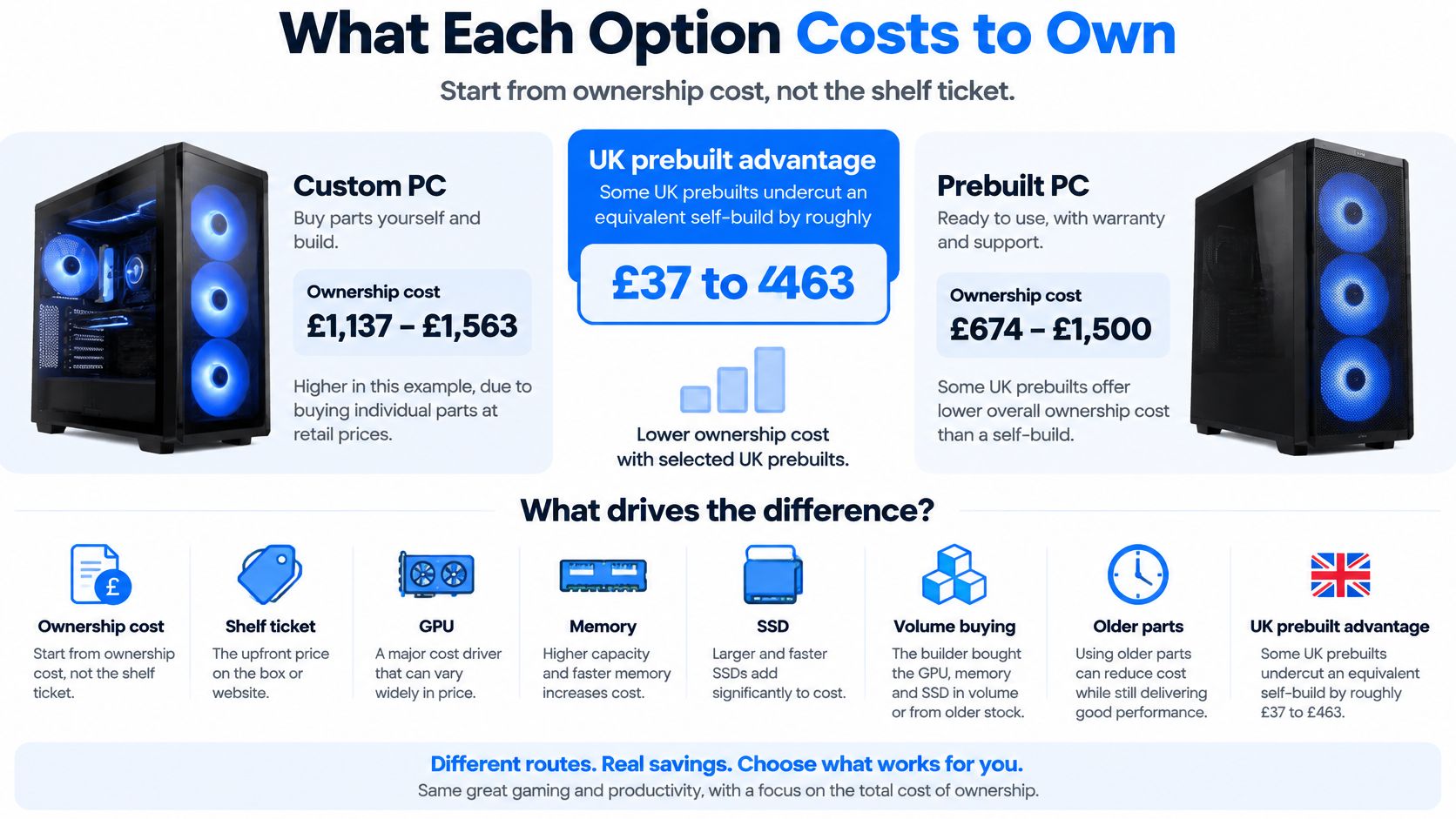
UK pricing mechanics sit on top of that sticker. Components carry 20% VAT, and a product with a US-equivalent price of $599 may commonly reach £550-£620 after VAT and retailer margin, which is why a US forum total is a poor guide to a Sheffield checkout. If you are turning a basket into a real quote, our notes on how much it costs to build a gaming PC are the place to add the licence and the test time before you call the list a saving.
Electricity at three hours a day
A UK electricity buying guide puts a gaming desktop at roughly 250-600 W under heavy load and a standard desktop at 60-200 W. At the cited rate of 26.32p/kWh, a 450 W gaming setup used for three hours a day costs about £130 per year in electricity alone. Run that example forward and you are near £390 over three years and £650 over five, before any upgrade.
Load profile | Draw |
|---|---|
Light office desktop | 60 W |
Busy office desktop | 200 W |
Gaming desktop under load | 250-600 W |
Worked gaming example | 450 W |
High-end gaming | 500-600 W |
At the same three hours a day, the light end of a standard desktop (60 W) lands near £17 a year and the busy end (200 W) near £58. The high-load gaming band, 500-600 W, sits well above the £130 example. An inefficient supply or a case that keeps fans at full speed does not change the rate. It keeps you in the expensive part of that band for more of the evening.
Two 2026 price points beside that maths
Put current listings next to the running cost, not instead of it. The PC Specialist Fusion 25 Mega Gaming Bundle is £1,150 new. It pairs an AMD Ryzen 5 5500 with an MSI GeForce RTX 5060 8GB, 16GB DDR4, a 512GB NVMe SSD and a Corsair CX550W, and the bundle includes a monitor and peripherals. At the other end, the refurbished liquid-cooled LC OC RTX 5090 Gaming PC is listed at £5,900, with an AMD Ryzen 9 9950X3D, 32GB DDR5 and a 2TB NVMe drive.
The £1,150 bundle is the rational mainstream buy if the 5060 tier matches the games and the case still opens. The £5,900 system is a different job, a high-core CPU and a top-tier card, and its electricity will sit toward the top of the load table whenever that card is busy. On either machine, add a likely RAM, SSD or GPU change around year three. A restrictive case, a proprietary board or an inefficient supply can force that change early, which is how the cheaper box becomes the dearer one.
Where Performance Actually Diverges
The measurable advantage of a custom specification is control over how each part is allowed to run. Two systems using the same CPU, GPU, memory configuration and power limits should produce broadly comparable results. When they do not, the gap usually traces to cooling, firmware power limits, memory channel configuration and sustained thermal behaviour under load. Assembly labour is not a performance part. Who tightened the screws does not add frames; how the hardware holds its clocks through the second hour of play does.
That control matters past launch week. The same choices that shape performance today decide whether the machine accepts an upgrade in year three or demands a full replacement.
What to match before you trust a name
Headline CPU and GPU names are not a specification. Match the parts underneath before you treat two towers as equals.
GPU model, not series: An RTX 5060 8GB and a higher 50-series card are different silicon. Frame rate follows the card once the processor is adequate, so a mid-range gaming budget should put its largest share into graphics.
RAM capacity, speed and layout: 16GB in one stick is not 16GB in two. Single-channel memory is a common prebuilt saving, and the cost shows up in 1% lows rather than on the box art.
SSD type and size: A 512GB NVMe can be fast and still be full within a year of game installs and captures. Check the free capacity, not only the badge.
Motherboard chipset: A low-end board can block the next CPU generation and leave you without a second M.2 socket, which turns a cheap upgrade into a rebuild around a new board.
PSU wattage and efficiency rating: Wattage has to cover the card you will buy next as well as the one inside today, and a higher efficiency rating wastes less of that wattage as heat the case then has to move.
Cooler type: A stock air tower, a 240 mm loop and a 360 mm loop do not hold the same boost clocks once the room is warm.
The usual prebuilt compromises are a single stick of RAM, an undersized SSD, a proprietary supply, a solid front panel with poor intake, and a board that will not take the next CPU. Any one of these can force a replacement where a standard part would have taken an upgrade. The comparison cuts the other way too: a prebuilt on standard parts, with Windows included and validation already done, can beat a self-build whose supply is mismatched to the card.
Creators and the soak test
For 1440p gaming, the extra spend belongs on the GPU. For video or 3D work, move budget to 32GB or more of RAM and a fast NVMe drive before paying for a larger card for accelerated effects. On long exports, a higher-quality supply and an airflow-focused case return more than another strip of lighting.
Build quality then comes down to component grade, a certified supply, documented BIOS settings and a soak test. Before trusting either route, check independent gaming frame-rate tests, CPU multi-core results, SSD temperatures and noise under load. If the SSD is thermally throttling or the fans are straining at 30 minutes, the benchmark screenshot from minute one was the wrong evidence.
Two PCs with the same parts should score close. If they do not, look at cooling, one RAM stick and the power limit before you blame the assembler.
Warranty Cover and Who Fixes a Fault
A long prebuilt warranty is not automatically the safer bet. It helps only if that seller diagnoses the fault, keeps your files intact and gets the machine back quickly. Shipping a whole tower for a GPU or power fault can cost a small firm more in downtime than the cover is worth.
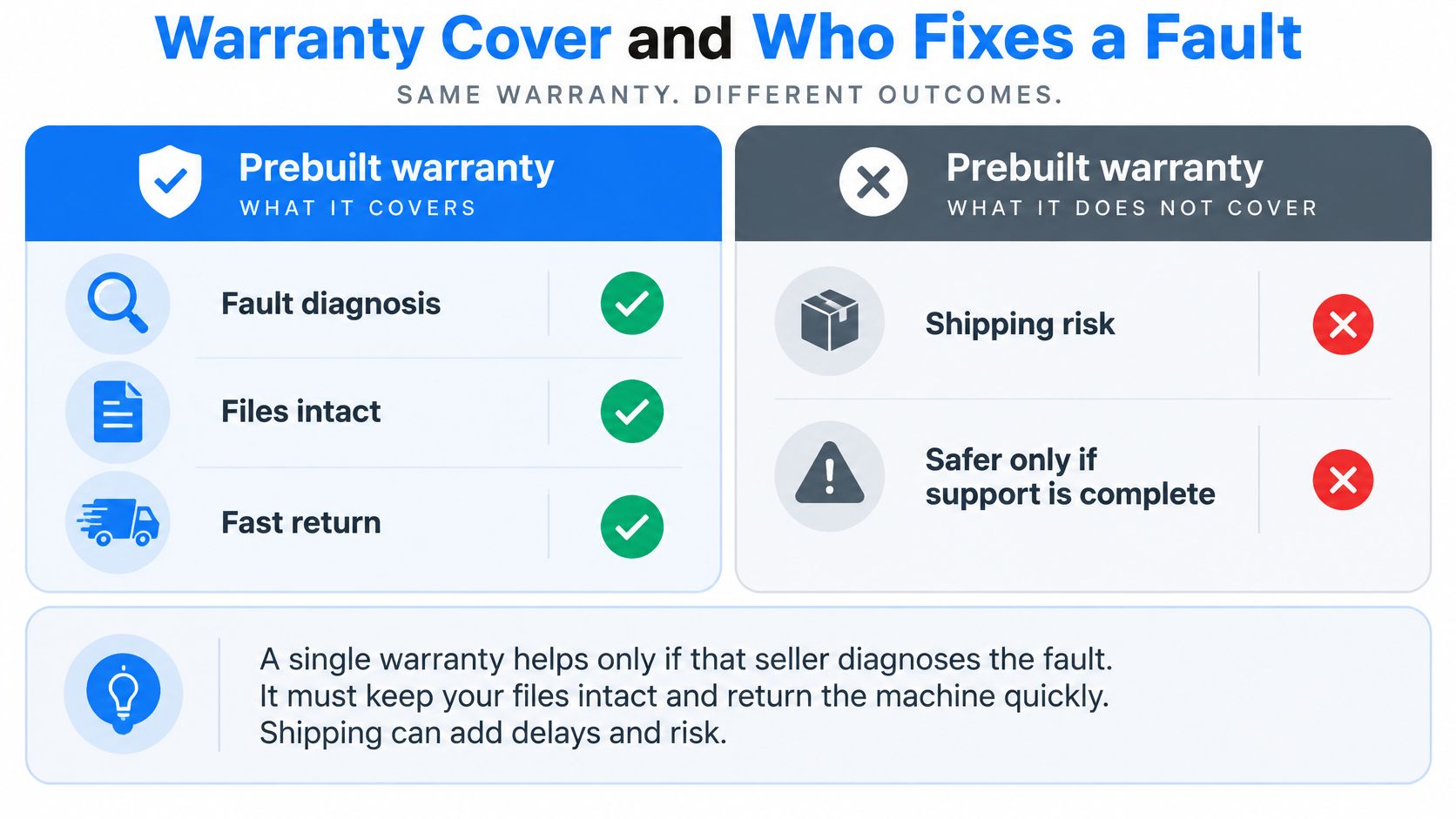
The 30-day and six-month position
UK consumers do have statutory protections. Guidance cited in a 2026 upgrade-path guide states that faults within the first 30 days may allow rejection and a full refund, while faults appearing within six months are generally presumed to have existed at delivery. That presumption does not tell you whether the drive can be imaged first, whether BIOS settings survive the return, or whether a failed GPU, storage device or power circuit can be repaired rather than swapped as a whole PC.
On a self-sourced build the warranties sit with the graphics card, board, supply and memory makers, and you have to show which part failed. That is manageable if the parts are standard and someone local will test them. It is a poor plan if your only next step is a courier label and a wiped drive.
The same UK-oriented coverage estimates that refurbished or second-hand units account for 12-15% of unit sales. Ask what was tested, not only whether a warranty sticker is present. Imported desktops and components also face landed-cost pressure, which is another reason a "longer cover" line on a listing is not the same thing as a short repair.
What the paperwork still will not answer
Custom-built, configured or personalised computers and components are non-returnable unless faulty. That is fair for a one-off spec. It also means you should confirm the soak test, the written parts list and the boot behaviour before you accept the machine. A change of mind is not a fault. A card that crashes after an hour is.
If the setup involves a laptop on a desk rather than a tower under a monitor, the failure path changes again. Start by choosing Lenovo laptop specs from Used Mobiles 4 U so you know which board, screen and storage you are covering, instead of assuming a desktop warranty model.
For Sheffield households and small offices, rank the clearest failure path above the longest marketing warranty. Standard parts, a written spec, and someone nearby who can repair a board or a graphics card beat posting the whole system away. Custom and prebuilt are not reliability categories. Build quality, standardisation, documentation, testing and who answers the phone matter more than who held the screwdriver.
Time to First Boot and Upgrade Room
A prebuilt in stock can be on the desk the same afternoon. A careful self-build takes an evening to a weekend once BIOS updates, chipset drivers, Windows updates and a stability run are included. A commissioned build sits between them. You wait for assembly and testing, then switch on a machine that has already been run.
That wait is rational in a market that is mostly machines people already own. In 2022, desktop computers generated approximately US$600 million in UK revenue, the wider UK PC market was about US$5.7 billion, and 88% of UK households owned a home computer, according to a figure attributed to the Office for National Statistics in Statista's UK desktop PC topic. Buying is one stage. Diagnostics, RAM and SSD upgrades, a graphics-card swap and a clean Windows install are the rest of the life.
What a tested first boot looks like
Two build standards show the difference between "it powers on" and "it is finished".
The LC OC RTX 5090 Gaming PC is torn down, chemically cleaned, repasted with premium thermal compounds and stress-tested for 48 hours before sale. That is the high end. It is also what a first boot should mean on a liquid-cooled flagship, firmware and BIOS already current, thermals already proven.
A mainstream gaming bundle can be built and stress-checked by an engineer, with a clean Windows install and no trial software. We set machines up that way so the first boot shows real speed rather than a desktop full of offers. Gaming PCs we assemble can be specified with your choice of CPU, GPU, RAM, storage (HDD or SSD) and cooling, so the limits are chosen rather than discovered after delivery.
The upgrade inspection
Before you treat any tower as a platform, check five things. Our PC upgrade notes walk the same inspection on machines people already own.
A standard ATX board, not a proprietary OEM layout with laptop-style power plugs.
A non-proprietary PSU with spare GPU connectors and a wattage you can name.
Two RAM modules, or empty slots, so you are in dual channel and can add capacity later.
A free M.2 socket, because the boot drive should not be the only drive.
Case clearance for the length and thickness of the next graphics card, including the cooler height.
Proprietary boards and odd supplies are why a cheap tower cannot take the card you planned. If you cannot name the PSU wattage and the free slots, the machine is not a real upgrade platform, however new the GPU sticker looks.
Which PC to Buy and Where to Go Next
Match the route to the job, then stop. The picture below is the short version. The buyers after it are the ones we see most often.
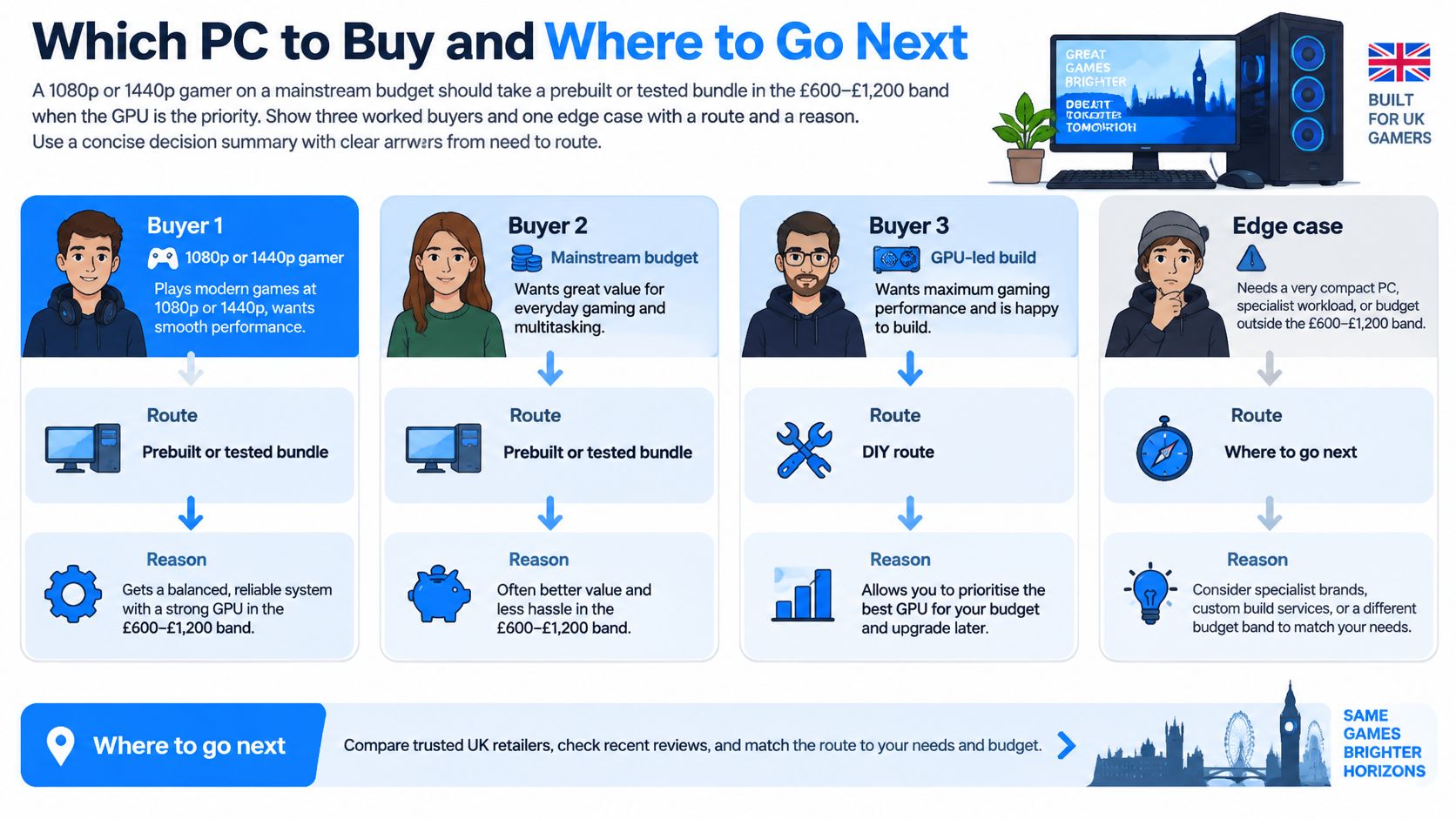
A 1080p or 1440p gamer on a mainstream budget should take a prebuilt or a tested bundle when the GPU tier is right and the parts are standard. Setup time matters more than hand-picking a case. You want the card that holds the frame rate, dual-channel memory and a supply you can read on the label. You do not need a weekend with a screwdriver to get there.
An enthusiast planning a graphics-card swap in two or three years should commission a custom or system-integrator build. The board, PSU and cooler have to be chosen for that swap, not discovered to be short when the new card arrives. This is the buyer for whom a generic retail spec is the expensive mistake.
A video or 3D creator should specify 32GB-class RAM and a large fast NVMe drive first. Extra lighting does not shorten an export. A high-RAM prebuilt is fine if the drive and the memory are already there. A spec-matched custom build is the better ask when they are not.
A small office should prefer a written parts list, Windows support and a local fix path, even with ordinary frame rates. A day offline costs more than a slower export. Peak frames per second are the wrong score for a machine that holds invoices and mail.
Edge case. A short-lived office task may suit a refurbished laptop. A living-room player may suit a console. Forcing either job into a full tower adds a supply, a case and a repair path you will not use.
Buyer | Prefer | Why this route |
|---|---|---|
1080p or 1440p gamer on a budget | Standard-parts prebuilt or tested bundle | Right GPU tier and same-week setup |
Enthusiast planning a GPU swap | Custom or system-integrator build | Board, PSU and cooler chosen for the next card |
Video or 3D creator | Spec-matched custom or a high-RAM prebuilt | 32GB-class RAM and fast NVMe before extra lighting |
Small office | Repairable system with a local fix path | Downtime and files matter more than peak fps |
Needed this week | In-stock prebuilt with a readable spec sheet | No assembly queue or soak-test wait |
Three rules before you order
If you need a working PC this week and the listing names a standard board, a known PSU wattage and dual-channel RAM, buy the prebuilt. If you will keep the tower about five years and expect to change the GPU, storage or cooler, commission a custom build. If downtime or lost files would cost money, rank the repair path above the longest warranty slogan.
For buyers in Sheffield, including Frecheville, Birley, Hackenthorpe and Woodhouse, Steel City IT builds custom gaming PCs and also handles hardware repair, logic-board repair, graphics-card and VRAM repair, SSD upgrades and data recovery. If you want a wider view of who assembles towers, our roundup of the best custom PC builders in the UK is a useful cross-check before you commit to a spec.
Before you order a card for a case you already own, message us and we will check fit. That includes a planned GPU such as an MSI GeForce RTX 3080 against the case and PSU you have now, so you are not buying a card the supply cannot feed.
A short walk-through of how builders weigh the same choice is worth ten minutes if you are still between a bundle and a commissioned spec.
Buy the machine whose next fault is a part swap, not a new computer.
We build and repair PCs in Sheffield, from a tested gaming bundle to a custom tower specified around your CPU, GPU, RAM, storage and cooling, plus board-level and graphics-card repair when a fault appears later. If you are weighing custom PC vs prebuilt and want the spec checked against the case and supply you already have, talk to Steel City IT before you order the next part.